
مقدمة
The GIGABYTE GM-M7600 is a wireless precision optical mouse designed for comfortable and reliable use. This manual provides instructions for setting up, operating, maintaining, and troubleshooting your device.
محتويات الحزمة
يرجى التحقق من محتويات الحزمة للتأكد من وجود جميع العناصر:
- GIGABYTE GM-M7600 Wireless Optical Mouse
- Portable Nano USB Receiver
- 2 بطاريات AAA
يثبت
1. تركيب البطاريات
The GM-M7600 mouse requires two AAA batteries for operation. The batteries are included in the package.
- حدد مكان غطاء حجرة البطارية على الجانب السفلي للفأرة.
- قم بتحريك الغطاء أو رفعه برفق لفتح الحجرة.
- Insert the two AAA batteries, ensuring the positive (+) and negative (-) terminals align correctly with the markings inside the compartment.
- أغلق غطاء حجرة البطارية جيدًا.
2. توصيل جهاز الاستقبال USB
The mouse connects to your computer via a portable Nano USB receiver.
- Locate the Nano USB receiver. It may be stored inside the mouse's battery compartment or packaged separately.
- Plug the Nano USB receiver into an available USB port on your computer (Laptop or Personal Computer).
- Your operating system (e.g., Windows XP, Linux) should automatically detect and install the necessary drivers. This process may take a few moments.
- بمجرد تثبيت برامج التشغيل، يصبح الماوس جاهزًا للاستخدام.
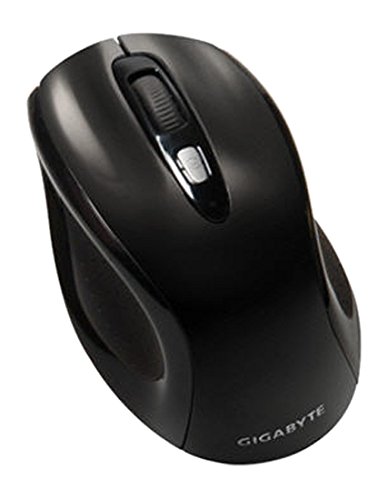
الشكل 1: GIGABYTE GM-M7600 Wireless Optical Mouse. This image displays the ergonomic design of the mouse, highlighting its form factor and the location of its buttons. The Nano USB receiver is typically stored within the mouse or connected to a computer's USB port.
تعليمات التشغيل
1. تشغيل / إيقاف التشغيل
The mouse typically has a power switch on its underside. Slide the switch to the 'ON' position to activate the mouse. Slide it to 'OFF' when not in use to conserve battery life.
2. ضبط حساسية الشاشة (DPI)
The GM-M7600 features an adjustable DPI switch, allowing you to change the mouse sensitivity between 800 DPI and 1600 DPI. This switch is usually located near the scroll wheel. Press the DPI button to toggle between the two sensitivity settings.
3. وظائف الماوس الأساسية
- الزر الأيسر: الزر الرئيسي لاختيار العناصر وفتحها fileوالتفاعل مع البرامج.
- انقر على اليمين: زر ثانوي للوصول إلى قوائم السياق والخيارات الإضافية.
- عجلة التمرير: يستخدم للتمرير عبر المستندات و web يمكن أن تعمل أيضًا كزر نقر أوسط.
صيانة
1. التنظيف
للحفاظ على الأداء والمظهر الأمثل:
- Disconnect the mouse from your computer and turn off the power switch.
- استخدم قطعة قماش ناعمة وخالية من الوبر وامسحها برفق.ampاغسل سطح الفأرة بالماء أو بمحلول تنظيف خفيف.
- تجنب استخدام المواد الكيميائية القاسية أو المنظفات الكاشطة أو رش السوائل مباشرة على الفأرة.
- Clean the optical sensor area on the underside of the mouse with a dry cotton swab to remove any dust or debris.
2. استبدال البطارية
When the mouse performance degrades or it stops responding, it may be time to replace the batteries.
- قم بإيقاف تشغيل الماوس باستخدام مفتاح الطاقة.
- Open the battery compartment as described in the 'Installing Batteries' section.
- قم بإزالة بطاريات AAA القديمة.
- أدخل بطاريتين جديدتين من نوع AAA، مع مراعاة القطبية الصحيحة (+/-).
- Close the battery compartment and turn the mouse back on.
استكشاف الأخطاء وإصلاحها
If you encounter issues with your GIGABYTE GM-M7600 mouse, try the following solutions:
- الفأرة لا تستجيب:
- تأكد من تشغيل الماوس.
- تأكد من تركيب البطاريات بشكل صحيح وشحنها بشكل كافٍ. استبدلها إذا لزم الأمر.
- تأكد من توصيل مستقبل USB النانوي بإحكام بمنفذ USB يعمل على جهاز الكمبيوتر الخاص بك. جرب منفذ USB آخر.
- أعد تشغيل الكمبيوتر الخاص بك.
- حركة المؤشر غير المنتظمة:
- قم بتنظيف المستشعر البصري الموجود على الجانب السفلي للفأرة.
- تأكد من استخدام الماوس على سطح مناسب. تجنب الأسطح العاكسة أو الشفافة للغاية.
- Check for any wireless interference. Move the mouse closer to the receiver or away from other wireless devices.
- DPI switch not working:
- تأكد من تشغيل الماوس وتوصيله بالكهرباء.
- اضغط على زر DPI بقوة.
تحديد
| اسم الموديل | GM-M7600 |
| ماركة | جيجابايت |
| تكنولوجيا الاتصال | 2.4GHz Radio Frequency Wireless |
| كشف الحركة | بصري |
| قابل للتعديل DPI | 800 / 1600 ديسيبل متوحد الخواص |
| عدد الأزرار | 3 (يسار، يمين، عجلة التمرير/النقر الأوسط) |
| مصدر الطاقة | 2 × بطاريات AAA (مضمنة) |
| نوع المستقبل | Portable Nano USB Receiver |
| الأجهزة المتوافقة | كمبيوتر محمول ، كمبيوتر شخصي |
| دعم نظام التشغيل | لينكس، ويندوز إكس بي |
| مواد التغليف | Plastic with Rubberized Finish |
| لون | أسود |
الضمان والدعم
For warranty information and technical support, please refer to the warranty card included with your product or visit the official GIGABYTE webموقع. احتفظ بإيصال الشراء الخاص بك لمطالبات الضمان.