
مقدمة
This manual provides essential information for the safe and efficient operation of your Brookstone iDesign Tower Stereo System. Please read this manual thoroughly before using the product and retain it for future reference.
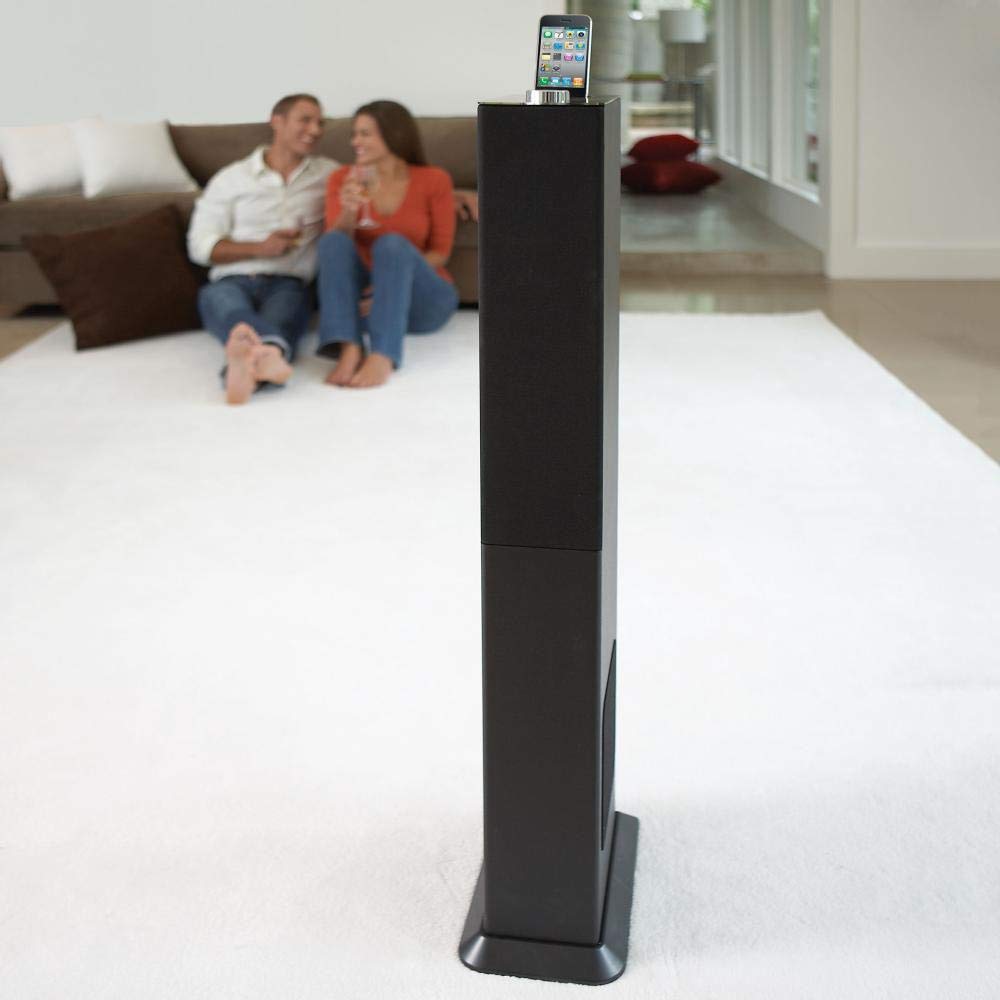
Image: The Brookstone iDesign Tower Stereo System, a tall, slender speaker unit designed for audio playback and device charging.
معلومات السلامة
- مصدر الطاقة: استخدم محول الطاقة المحدد فقط. تأكد من مستوى الصوتtage يطابق مصدر الطاقة المحلي لديك.
- تهوية: لا تسد أي فتحات تهوية. ثبّت المنتج وفقًا لتعليمات الشركة المصنعة.
- الماء والرطوبة: لا تعرض هذا الجهاز للمطر أو الرطوبة. لا تضع أشياء مملوءة بالسوائل، مثل المزهريات، على الجهاز.
- حرارة: لا تقم بالتثبيت بالقرب من أي مصادر للحرارة مثل المشعات أو فتحات التدفئة أو المواقد أو أي أجهزة أخرى (بما في ذلك ampالمُضخِّمات) التي تنتج الحرارة.
- تنظيف: نظف فقط بقطعة قماش جافة.
- الخدمة: قم بإحالة جميع أعمال الصيانة إلى موظفي الخدمة المؤهلين. الصيانة مطلوبة في حالة تعرض الجهاز للتلف بأي شكل من الأشكال.
محتويات الحزمة
يرجى التأكد من وجود جميع العناصر في العبوة:
- iDesign Tower Stereo System
- جهاز التحكم عن بعد
- محول الطاقة
- دليل المستخدم (هذا المستند)
- Note: iPod/iPhone devices are not included.
المنتج انتهىview
The iDesign Tower Stereo System features a sleek design with integrated speakers and a docking station for compatible Apple devices. It includes a backlit on/volume knob and a remote control for convenient operation, delivering full, deep bass, crisp, clear highs, and warm middle tones.
المكونات الرئيسية:
- شبكات مكبر الصوت: Multi-angled speakers for room-filling sound.
- ميناء الإرساء: For iPod and iPhone devices (1st and 2nd generation iPod touch, iPod classic, 4th and 5th generation iPod nano, iPhone 3GS, iPhone 3G, iPhone).
- On/Volume Knob: Backlit control for power and volume adjustment.
- المدخل المساعد: For connecting other audio devices (cable not included).
- مدخلات الطاقة: لتوصيل محول الطاقة.
- مستشعر التحكم عن بعد: يستقبل اشارات من جهاز التحكم عن بعد.
يثبت
1. تحديد مستوى
Place the iDesign Tower Stereo System on a stable, flat surface. Ensure there is adequate space around the unit for proper ventilation. Avoid placing it in direct sunlight or near heat sources.
2. توصيل الطاقة
- Connect the power adapter cable to the Power Input port on the back of the iDesign Tower Stereo System.
- قم بتوصيل محول الطاقة بمأخذ حائط قياسي.
3. Device Docking (iPod/iPhone)
The system is designed for specific iPod and iPhone models:
- iPod touch (1st and 2nd generation)
- آيبود كلاسيك
- iPod nano (4th and 5th generation)
- آيفون 3GS
- آيفون 3G
- آيفون
Carefully align your compatible iPod or iPhone device with the docking port and gently push it down until it is securely seated. The device will begin charging automatically when docked and the system is powered on.
4. Auxiliary Input (Optional)
To connect other audio devices (e.g., MP3 players, CD players) that are not compatible with the docking port, use a 3.5mm audio cable (not included) to connect the device's headphone output to the Auxiliary Input port on the iDesign Tower Stereo System.
تعليمات التشغيل
1. تشغيل/إيقاف التشغيل
Press the On/Volume knob to turn the system on or off. The knob will illuminate when the system is powered on.
2. التحكم في مستوى الصوت
Rotate the On/Volume knob clockwise to increase the volume and counter-clockwise to decrease it. You can also adjust the volume using the remote control.
3. اختيار المصدر
The system automatically detects a docked iPod or iPhone. If an auxiliary device is connected, you may need to select the input source using the remote control (if available) or by cycling through inputs with a dedicated button (refer to remote control section for details).
4. استخدام جهاز التحكم عن بعد
The included remote control allows you to manage playback functions (play, pause, skip tracks) and volume for your docked iPod or iPhone from a distance. Point the remote control towards the sensor on the front of the tower system.
5. أجهزة الشحن
When a compatible iPod or iPhone is docked and the system is powered on, the device will charge automatically.
صيانة
تنظيف
Wipe the exterior of the system with a soft, dry cloth. Do not use liquid cleaners or aerosol sprays, as these may damage the finish or internal components. Ensure the system is unplugged before cleaning.
تخزين
في حالة تخزين النظام لفترة طويلة، افصله عن مأخذ الطاقة وخزنه في مكان بارد وجاف، بعيدًا عن أشعة الشمس المباشرة ودرجات الحرارة القصوى.
استكشاف الأخطاء وإصلاحها
| مشكلة | السبب المحتمل | حل |
|---|---|---|
| لا يوجد طاقة | محول الطاقة غير موصول أو أن المقبس لا يعمل. | Ensure power adapter is securely connected to the system and a working wall outlet. |
| لا يصدر أي صوت من الجهاز المتصل بقاعدة الشحن | Device not properly docked; volume too low; device not playing. | Re-seat the device in the dock. Increase system volume and device volume. Ensure music is playing on the device. |
| No sound from auxiliary input | Auxiliary cable not connected; incorrect source selected; volume too low. | Ensure auxiliary cable is securely connected. Select auxiliary input. Increase system and source device volume. |
| جهاز التحكم عن بعد لا يعمل | Batteries dead; remote not pointed at sensor; obstruction. | Replace remote control batteries. Point remote directly at the sensor. Remove any obstructions between remote and system. |
| الجهاز لا يشحن | Device not compatible; system not powered on; device not properly docked. | Verify device compatibility (see Setup section). Ensure system is powered on. Re-seat the device in the dock. |
تحديد
- نموذج: B003YB9T2C
- ماركة: بروكستون
- أبعاد الحزمة: 42.6 × 14 × 8.6 بوصة
- وزن السلعة: 28.3 رطل
- أول متاح: 10 مارس 2010
- التوافق: iPod touch (1st/2nd gen), iPod classic, iPod nano (4th/5th gen), iPhone 3GS, iPhone 3G, iPhone.
الضمان والدعم
For warranty information and customer support, please refer to the documentation included with your purchase or visit the official Brookstone webالموقع. احتفظ بإثبات الشراء الخاص بك لتقديم مطالبات الضمان.
"Made for iPod" and "Made for iPhone" mean that an electronic accessory has been designed to connect specifically to iPod or iPhone, respectively, and has been certified by the developer to meet Apple performance standards. Apple is not responsible for the operation of this device or its compliance with safety and regulatory standards. Please note that the use of this accessory with iPod or iPhone may affect wireless performance.