
مقدمة
شكرا لك على الشراءasing the SENTRY CL933 Big Screen Weather Alarm Clock. This device combines a digital alarm clock with a large LCD display, providing essential information such as time, date, indoor temperature, humidity, and a weather forecast. This manual will guide you through the setup, operation, and maintenance of your new alarm clock.
معلومات السلامة
- لا تعرض الجهاز لدرجات حرارة قصوى أو لأشعة الشمس المباشرة أو الرطوبة العالية.
- تجنب إسقاط الوحدة أو تعريضها لصدمات قوية.
- لا تخلط بين البطاريات القديمة والجديدة أو أنواع مختلفة من البطاريات.
- قم بإزالة البطاريات إذا لم يتم استخدام الوحدة لفترة طويلة.
- نظّف الجهاز بقطعة قماش ناعمة وجافة. لا تستخدم منظفات أو مذيبات كاشطة.
- هذا المنتج مخصص للإستخدام الداخلي فقط.
محتويات الحزمة
يرجى التأكد من وجود جميع العناصر:
- SENTRY CL933 Big Screen Weather Alarm Clock
- دليل المستخدم (هذا المستند)
المنتج انتهىview
The SENTRY CL933 features a large, easy-to-read LCD display and intuitive controls. Familiarize yourself with the main components:
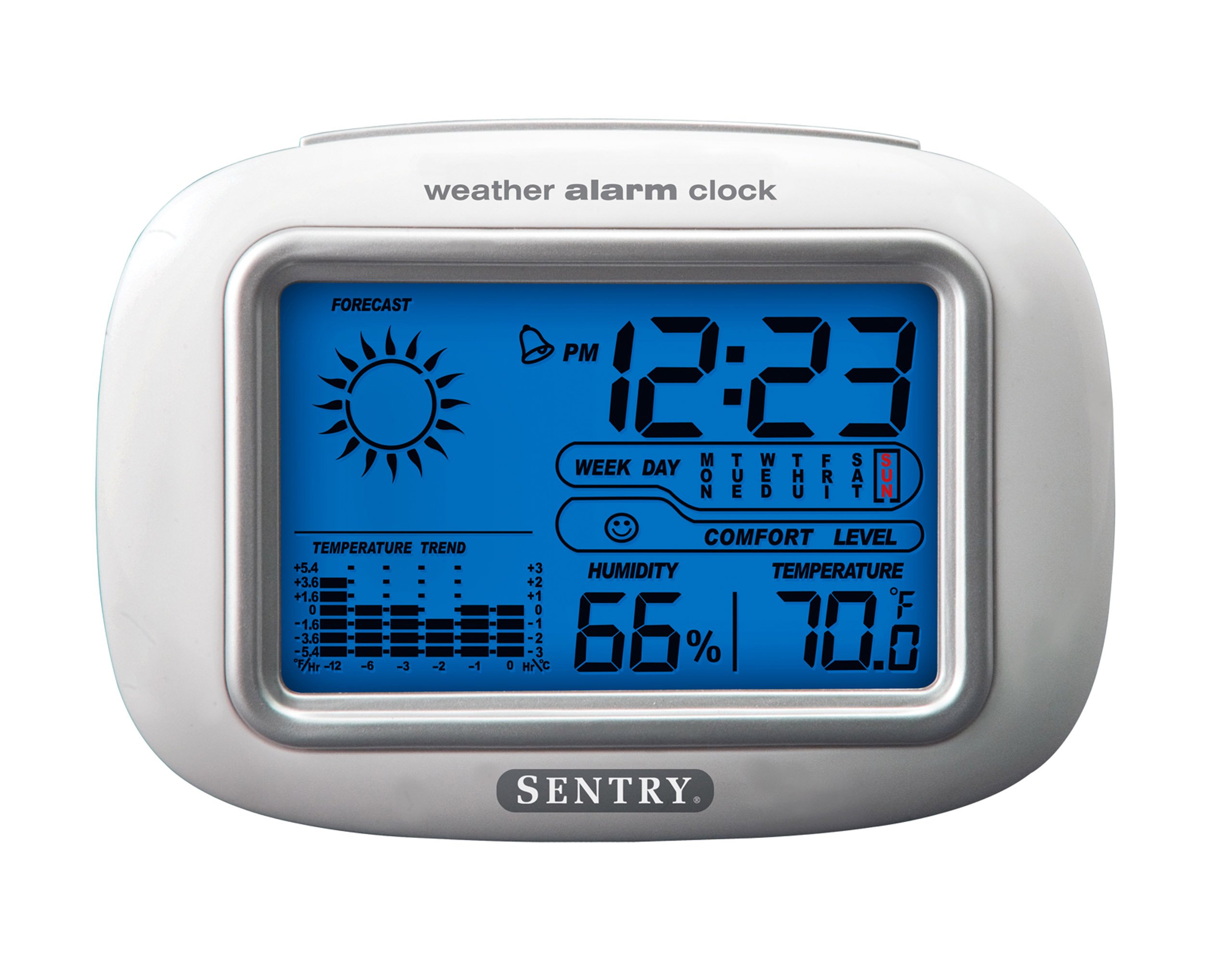
The SENTRY CL933 Big Screen Weather Alarm Clock displayed in its retail packaging, showing the clock face with time, weather forecast, humidity, and temperature readings.
عناصر العرض:
- عرض الوقت: Shows current time (12/24 hour format).
- التاريخ واليوم من الأسبوع: Displays the current date and day.
- Weather Forecast Icon: Indicates predicted weather conditions (e.g., sunny, cloudy, rainy).
- أيقونة مرحلة القمر: Shows the current moon phase.
- عرض درجة الحرارة: يعرض درجة الحرارة الداخلية بالدرجة المئوية أو الفهرنهايتية.
- عرض الرطوبة: Shows indoor humidity percentage.
- رمز مستوى الراحة: Indicates the comfort level based on temperature and humidity.
- مؤشر اتجاه درجة الحرارة: Shows if the temperature is rising, falling, or stable over the last 12 hours.
- أيقونة التنبيه: Indicates when the alarm is set.
Control Buttons (typically on the back or sides):
- زر الوضع/الضبط: Used to switch between display modes and enter setting mode.
- أزرار أعلى/أسفل: Used to adjust values during setting and sometimes to toggle display options.
- زر التنبيه: Used to set or activate/deactivate the alarm.
- زر الغفوة/الإضاءة: Activates the backlight and functions as the snooze button when the alarm sounds.
- زر ° C / ° F: يُبدّل بين عرض درجة الحرارة بالدرجة المئوية والفهرنهايتية.
يثبت
1. تركيب البطارية
- حدد موقع غطاء حجرة البطارية على الجزء الخلفي من الوحدة.
- قم بإزالة الغطاء عن طريق سحبه أو رفعه.
- Insert two (2) new AAA batteries (not included) according to the polarity indicators (+ and -) inside the compartment.
- أعد تركيب غطاء حجرة البطارية بشكل آمن.
- The clock will power on and the display will activate.
2. التعيين الأولي
Place the alarm clock on a stable, flat surface away from direct heat sources, strong vibrations, or areas with extreme temperature fluctuations for accurate readings.
تعليمات التشغيل
1. ضبط الوقت والتاريخ
- اضغط مع الاستمرار على مجموعة الوضع button for approximately 3 seconds to enter time setting mode. The hour digit will start flashing.
- استخدم UP or تحت أزرار لضبط الساعة.
- يضعط مجموعة الوضع مرة أخرى لتأكيد الساعة والانتقال إلى ضبط الدقائق.
- Repeat steps 2 and 3 for minutes, year, month, and day.
- بعد ضبط اليوم، اضغط على مجموعة الوضع للمرة الأخيرة للخروج من وضع الإعدادات.
- To switch between 12-hour and 24-hour time format, press the UP اضغط على الزر أثناء وميض الساعة أثناء ضبط الوقت.
2. ضبط المنبه
- اضغط على إنذار اضغط على الزر مرة واحدة لعرض وقت التنبيه الحالي.
- اضغط مع الاستمرار على إنذار button for approximately 3 seconds. The alarm hour digit will start flashing.
- استخدم UP or تحت أزرار لضبط ساعة التنبيه.
- يضعط إنذار again to confirm the hour and move to the alarm minute setting.
- استخدم UP or تحت أزرار لضبط دقيقة التنبيه.
- يضعط إنذار one last time to confirm and exit alarm setting mode.
- لتنشيط أو إلغاء تنشيط التنبيه، اضغط على إنذار button briefly when the current time is displayed. An alarm icon will appear on the display when the alarm is active.
3. وظيفة الغفوة والإضاءة الخلفية
- عندما يصدر صوت التنبيه ، اضغط على غفوة / ضوء button to activate the snooze function. The alarm will temporarily stop and sound again after a few minutes (typically 5-10 minutes).
- To turn off the alarm completely, press any other button (e.g., إنذار, مجموعة الوضع) when the alarm is sounding.
- اضغط على غفوة / ضوء button at any time to activate the backlight for a few seconds, illuminating the display for easy viewing in low light conditions. The backlight is not designed to stay on continuously to conserve battery life.
4. Temperature Unit Selection (°C/°F)
اضغط على ° C / ° F button (usually located on the back or side) to toggle the temperature display between Celsius and Fahrenheit.
5. Understanding Weather and Environmental Displays
- النشرة الجوية: The icon (e.g., sun, clouds, rain) represents a prediction of the weather for the next 12-24 hours based on atmospheric pressure changes detected by the internal sensor. This is an estimate and may not always match official weather reports.
- رطوبة: Displays the current indoor relative humidity percentage.
- مستوى الراحة: An icon (e.g., smiley face, neutral face, frowny face) indicates the indoor comfort level based on the combination of temperature and humidity.
- اتجاه درجة الحرارة: The arrow indicator shows if the indoor temperature has been rising, falling, or remaining stable over the past 12 hours.
- مرحلة القمر: The moon icon changes to reflect the current phase of the moon.
صيانة
- تنظيف: امسح الوحدة بقطعة قماش ناعمة وخفيفة دamp قماش. لا تستخدم مواد كيميائية قاسية أو مواد كاشطة.
- استبدال البطارية: When the display becomes dim or functions become erratic, replace the two AAA batteries. Ensure correct polarity.
- تخزين: إذا كنت ستقوم بتخزين الساعة لفترة طويلة، قم بإزالة البطاريات لمنع التسرب.
استكشاف الأخطاء وإصلاحها
| مشكلة | السبب المحتمل / الحل |
|---|---|
| العرض فارغ أو خافت. | Batteries are low or incorrectly installed. Replace with new AAA batteries, ensuring correct polarity. |
| لا يمكن تحديد الوقت/التاريخ. | تأكد من الضغط مع الاستمرار على مجموعة الوضع زر لمدة 3 ثوان للدخول في وضع الإعداد. |
| لا يصدر صوت الإنذار. | The alarm may not be activated. Press the إنذار button briefly to ensure the alarm icon is displayed. Check alarm time setting. |
| درجة الحرارة/الرطوبة غير دقيقة. | The unit may be placed near a heat source, vent, or in direct sunlight. Move the clock to a more stable environment. Readings are for indoor conditions only. |
| يبدو أن توقعات الطقس غير صحيحة. | The weather forecast is an estimate based on internal barometric pressure changes and may not always align with local weather reports. It is a general trend indicator. |
تحديد
- نموذج: سي إل 933
- ماركة: خفير
- نوع العرض: شاشة LCD رقمية بإضاءة خلفية
- مصدر الطاقة: تعمل بالبطارية
- البطاريات المطلوبة: شنومكس x آا (غير مدرجة)
- أبعاد: 6.5 × 2.25 × 4.25 بوصة (16.5 × 5.7 × 10.8 سم)
- وزن: 6.2 أونصة (176 جرام)
- سمات: Time, Date, Day of Week, Alarm, Snooze, Indoor Temperature (°C/°F), Indoor Humidity, Weather Forecast Icons, Moon Phase, Comfort Level Indicator, 12-hour Temperature Trend.
- نوع التركيب: سطح الطاولة
الضمان والدعم
SENTRY products are designed for reliability and performance. For any questions, technical support, or warranty inquiries, please refer to the contact information provided with your purchase or visit the official SENTRY webيرجى الاحتفاظ بإثبات الشراء الخاص بك للمطالبة بالضمان.