
1. المقدمة
The Bayer Contour TS Low Level Control Solution is designed for use with the Contour TS Blood Glucose Monitoring System. This solution is used to verify the accuracy of your blood glucose meter and test strips. It contains a known amount of glucose that reacts with the test strips, allowing you to confirm that your system is working correctly. Regular use of control solutions helps ensure reliable test results.
مهم: هذا الحل للتحكم مخصص لـ في المختبر diagnostic use only. It is not intended for internal use or for testing on humans or animals.
2. معلومات السلامة
- ل في المختبر diagnostic use only: لا يُبتلع. يُحفظ بعيداً عن متناول الأطفال.
- تاريخ انتهاء الصلاحية: Always check the expiration date printed on the vial label. Do not use expired control solution.
- تخزين: Store the control solution at room temperature (between 15°C and 30°C or 59°F and 86°F). Do not freeze.
- تلوث: Avoid contaminating the control solution. Do not touch the tip of the vial to the test strip or any other surface.
- تصرف: Dispose of used control solution vials and test strips according to local regulations for biohazardous waste.
3. محتويات العبوة
تحتوي الحزمة الخاصة بك على:
- One (1) vial of Bayer Contour TS Low Level Control Solution (2.5 mL)
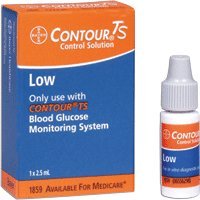
Image: A single vial of Bayer Contour TS Low Level Control Solution. The label indicates 'Low Level' and the volume of 2.5 mL.
4. الإعداد والتحضير
- جمع المواد: Ensure you have your Contour TS meter, a Contour TS test strip, and the Contour TS Low Level Control Solution.
- تحقق من تواريخ انتهاء الصلاحية: تأكد من أن شرائط الاختبار ومحلول التحكم ليسا منتهي الصلاحية. لا تستخدم المنتجات منتهية الصلاحية.
- Prepare Control Solution: Gently invert the control solution vial several times to mix the contents. Do not shake vigorously, as this can create bubbles.
- أدخل شريط الاختبار: Insert a new Contour TS test strip into the meter as directed in your meter's user manual. The meter should turn on automatically.
5. Operating Instructions (Performing a Control Test)
اتبع هذه الخطوات لإجراء اختبار تحكم:
- تطبيق محلول التحكم: With the test strip inserted into the meter, remove the cap from the control solution vial. Squeeze the vial gently to dispense a small drop of control solution onto the tip of the test strip. Ensure the test strip absorbs enough solution to start the test.
- انتظر النتيجة: The meter will begin counting down. Do not remove the test strip until the result is displayed.
- النتيجة القياسية: Note the control test result displayed on the meter.
- Compare to Range: Compare the displayed result with the acceptable range printed on the Contour TS test strip vial label. The result should fall within this specified range.
- Cap Vial: Immediately replace the cap on the control solution vial after use to prevent contamination and evaporation.
6. الصيانة والتخزين
- ظروف التخزين: Store the control solution vial tightly capped at room temperature (15°C - 30°C or 59°F - 86°F). Do not refrigerate or freeze.
- مدة الصلاحية: The control solution is stable until the expiration date printed on the label when stored unopened. Once opened, the control solution is typically stable for 90 days or until the expiration date, whichever comes first. Write the date you opened the vial on the label to track its usability.
- نظافة: Keep the vial and its cap clean. Avoid touching the dispenser tip.
- تصرف: Dispose of the control solution vial and any used test strips responsibly, following local guidelines for medical waste.
7. استكشاف الأخطاء وإصلاحها
If your control test result falls outside the acceptable range, consider the following:
- تحقق من تواريخ انتهاء الصلاحية: تأكد من أن كلاً من محلول التحكم وشرائط الاختبار غير منتهية الصلاحية.
- ظروف التخزين: تأكد من تخزين محلول التحكم وشرائط الاختبار بشكل صحيح، بعيدًا عن درجات الحرارة القصوى أو أشعة الشمس المباشرة.
- تقنية التطبيق: Ensure you applied enough control solution to the test strip and that the strip absorbed it properly.
- Vial Contamination: Check if the control solution vial tip has touched any surface, potentially causing contamination.
- عطل في العداد: If all other factors are ruled out, your meter may require servicing. Refer to your Contour TS meter's user manual for troubleshooting specific error codes or contact customer support.
- إعادة الاختبار: Perform another control test with a new test strip and fresh control solution. If the result is still out of range, do not use your meter for blood glucose testing until the issue is resolved.
8. المواصفات
- اسم المنتج: Contour TS Low Level Control Solution
- الشركة المصنعة: باير
- مقدار: 2.5 mL per vial
- يكتب: مستوى منخفض
- الاستخدام المقصود: ل في المختبر diagnostic use with Contour TS Blood Glucose Monitoring Systems
- درجة حرارة التخزين: 15°م - 30°م (59°ف - 86°ف)
- وزن السلعة: حوالي 0.01 أونصة
- رمز المنتج العالمي: 301937109010
9. الضمان والدعم
For specific warranty information regarding the Bayer Contour TS Low Level Control Solution, please refer to the documentation provided with your Contour TS Blood Glucose Monitoring System or contact Bayer customer support directly. General product information and support can often be found on the official Bayer webموقع.
الشركة المصنعة: باير
Webموقع: www.bayer.com
For technical assistance or to report product issues, please use the contact information provided in your meter's user manual or on the Bayer webموقع.