
في تيك 80-109744
VTech Schulstart Laptop E Instruction Manual
نموذج: شنومكس-شنومكس
1. المقدمة
This manual provides essential information for the safe and effective use of your VTech Schulstart Laptop E. This learning computer is designed for children aged 6 and up, offering 160 educational games in both German and English. It covers subjects such as letters, words, mathematics, nature, science, and creativity.
يرجى قراءة هذا الدليل بعناية قبل تشغيل الجهاز والاحتفاظ به للرجوع إليه في المستقبل.
2. معلومات السلامة
تحذير: Choking hazard due to small parts that can be swallowed. Not suitable for children under 36 months.
تحذير: Strangulation hazard. Keep packaging materials away from children.
- قم دائمًا بمراقبة الأطفال أثناء الاستخدام.
- لا تعرض الجهاز لدرجات حرارة شديدة أو لأشعة الشمس المباشرة.
- حافظ على الجهاز جافًا. لا تغمره في الماء أو أي سوائل أخرى.
- نظّف الجهاز بقطعة قماش ناعمة وجافة. لا تستخدم منظفات كاشطة.
- تأكد من إدخال البطاريات بشكل صحيح وفقًا لعلامات القطبية.
- قم بإزالة البطاريات المستنفدة على الفور.
- لا تخلط بين البطاريات القديمة والجديدة أو أنواع مختلفة من البطاريات.
- لا يجوز إعادة شحن البطاريات غير القابلة لإعادة الشحن.
- لا يجوز شحن البطاريات القابلة لإعادة الشحن إلا تحت إشراف شخص بالغ.
- قم بإزالة البطاريات القابلة لإعادة الشحن من اللعبة قبل الشحن.
- لا يجوز حدوث قصر في دوائر الإمداد.
3. محتويات العبوة
The VTech Schulstart Laptop E package includes:
- 1 x VTech Schulstart Laptop E
- 1 x Cursor Mouse
- 3 x AA Demonstration Batteries (for test purposes only)
Note: A VTech power adapter and VTech laptop bag are sold separately and are not included.
4. الإعداد
4.1 تركيب البطارية
The device requires 3 AA batteries. The included demonstration batteries are for testing purposes only and should be replaced with new batteries for regular use.
- حدد مكان حجرة البطارية في الجانب السفلي من الكمبيوتر المحمول.
- باستخدام مفك البراغي ، افتح غطاء حجرة البطارية.
- Remove the old demonstration batteries (if present).
- أدخل 3 بطاريات AA جديدة، مع التأكد من صحة القطبية (+/-) كما هو موضح داخل الحجرة.
- استبدل غطاء حجرة البطارية وثبته بالمسمار.

Figure 4.1: Battery installation guide. Replace demonstration batteries with new ones for extended play.
4.2 Connecting the Cursor Mouse
The VTech Schulstart Laptop E comes with a wired cursor mouse for interactive play.
- Locate the mouse port on the side of the laptop.
- Carefully insert the mouse connector into the port.
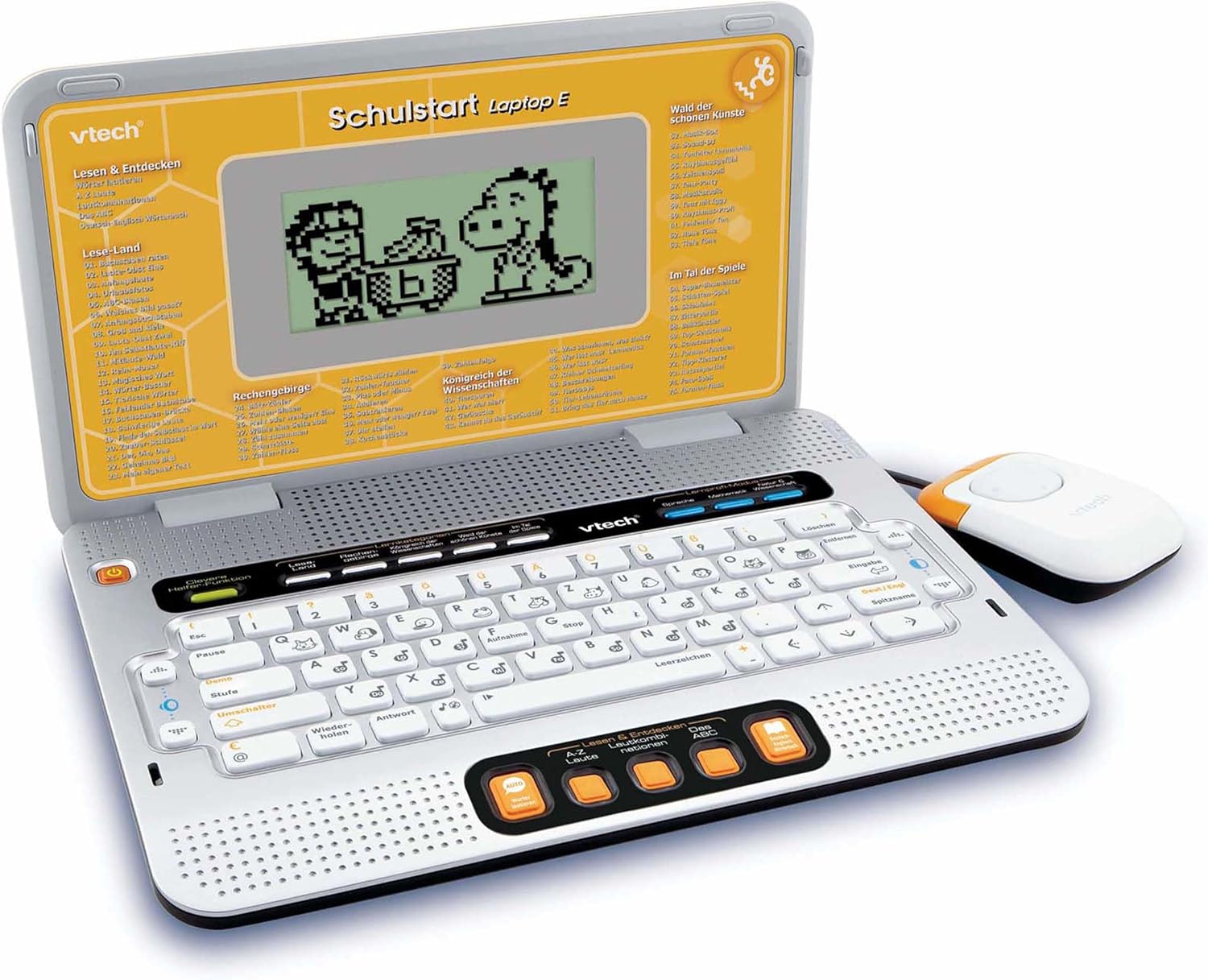
Figure 4.2: VTech Schulstart Laptop E with connected cursor mouse.
5. تعليمات التشغيل
5.1 تشغيل/إيقاف التشغيل
To turn on the laptop, press the قوة button, usually located on the top left of the keyboard area. To turn off, press the قوة button again or the laptop will automatically shut down after a period of inactivity to conserve battery life.
5.2 اختيار اللغة
The VTech Schulstart Laptop E supports both German and English. You can switch between languages using the dedicated language selection button or through the settings menu, if available. Refer to the on-screen prompts for initial setup.
5.3 Game Categories and Selection
The laptop features 160 educational games categorized as follows:
- Language Tools: 5 برامج
- Letters & Words: 23 برامج
- الرياضيات: 16 برامج
- Nature & Science: 12 برامج
- إِبداع: 12 برامج
- Logic & Games: 12 برامج
Use the arrow keys and the Enter button on the keyboard, or the cursor mouse, to navigate through the menu and select a game.

Figure 5.1: Navigating game categories on the VTech Schulstart Laptop E.
5.4 Tutor Function and Learning Modes
The laptop includes a Tutor function and a Learning Pro mode to enhance the learning experience:
- Tutor Function: Features 5 direct-dial keys for language tools (sounds, phonics, sound combinations, ABC with example words, German-English dictionary). These programs assist with letter pronunciation and reading.
- Learning Pro Mode: Offers progressive learning through increasing difficulty levels, adapting to the child's progress.
- Smart Helper Function: Provides additional hints and tips in many educational games upon request.

Figure 5.2: Child using the VTech Schulstart Laptop E's interactive learning features.
6. الصيانة
6.1 التنظيف
To clean the VTech Schulstart Laptop E, use a soft, slightly damp استخدم قطعة قماش. لا تستخدم مواد كيميائية قاسية أو منظفات كاشطة. تأكد من إيقاف تشغيل الجهاز وفصله عن أي مصدر طاقة قبل التنظيف.
6.2 التخزين
Store the laptop in a cool, dry place away from direct sunlight and extreme temperatures. If the device will not be used for an extended period, remove the batteries to prevent leakage.

Figure 6.1: Optional VTech laptop bag for storage and transport (sold separately).
7. استكشاف الأخطاء وإصلاحها
| مشكلة | السبب المحتمل | حل |
|---|---|---|
| الجهاز لا يعمل. |
|
|
| الشاشة فارغة أو تومض. |
|
|
| Keys or mouse not responding. |
|
|
| الصوت مشوه أو غائب. |
|
|
8. المواصفات
- رقم الموديل: 80-109744
- الأبعاد (الطول × العرض × الارتفاع): 4 x 28 x 20 cm (1.57 x 11.02 x 7.87 inches)
- وزن: 1.29 كجم (2.84 رطل)
- العمر الموصى به: 6 سنوات وما فوق
- البطاريات: 3 x AA (not included for regular use)
- اللغات: الألمانية والإنجليزية
- عدد الألعاب: 160
- تاريخ الافراج عنه: 31 يوليو 2010
9. الضمان والدعم
للحصول على معلومات الضمان ودعم العملاء، يرجى الرجوع إلى موقع VTech الرسمي website or contact your local VTech distributor. Keep your purchase receipt as proof of purchase.
شركة VTech الرسمية Webموقع: www.vtech.com
Ask a question about this manual
Ask about setup, troubleshooting, compatibility, parts, safety, or missing instructions. Manuals+ will review the question and use this page’s manual context to help answer it.