
1. المقدمة
This instruction manual provides essential information for the safe and efficient use of your THOMSON CE-26 Cassette/SD/USB Audio System. Please read this manual thoroughly before operating the device and retain it for future reference. The CE-26 allows you to play audio from cassettes, USB drives, and SD/MMC cards, as well as record audio directly from cassettes or external sources to MP3 format on USB or SD/MMC media.
2. انتهى المنتجview
Familiarize yourself with the components and controls of your CE-26 audio system.

الشكل 2.1: اللوحة الأمامية View. This image displays the front of the THOMSON CE-26 unit, showing the cassette deck, control buttons, display screen, USB port, SD/MMC card slot, and volume knob.
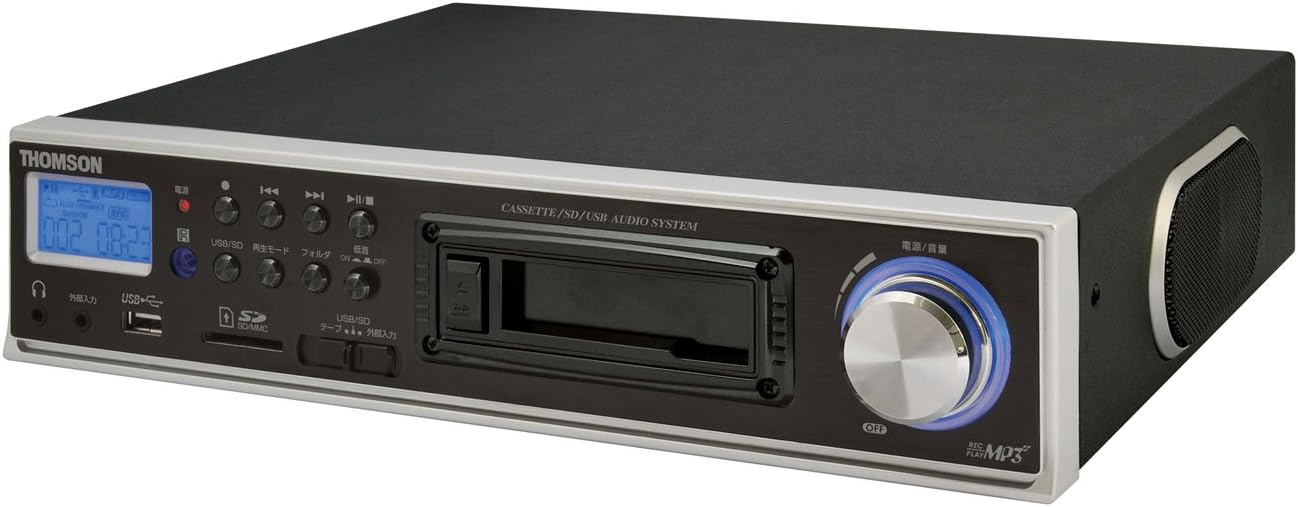
الشكل 2.2: بزاوية View. This image shows the THOMSON CE-26 from an angled perspective, highlighting the integrated side speaker and the overall compact design.

Figure 2.3: Remote Control Unit. This image displays the included remote control for the THOMSON CE-26, featuring buttons for search, display, record, playback mode, program, folder navigation, and USB/SD selection.

الشكل 2.4: الميزة النهائيةview رسم بياني. This diagram illustrates the key functionalities of the THOMSON CE-26, including direct recording from cassette to USB/SD, MP3/WMA playback, USB/SD memory copying, AUX input, built-in speaker, and remote control.
ضوابط اللوحة الأمامية:
- زر الطاقة: يقوم بتشغيل الوحدة أو إيقاف تشغيلها.
- شاشة العرض: Shows track information, mode, and time.
- سطح السفينة كاسيت: For inserting and playing audio cassettes.
- منفذ USB: Connect USB flash drives for playback or recording.
- فتحة بطاقة SD/MMC: Insert SD or MMC cards for playback or recording.
- عناصر التحكم في التشغيل: Play, Pause, Stop, Fast Forward, Rewind, Skip Track.
- زر التسجيل: يبدأ التسجيل.
- زر الوضع: Switches between Cassette, USB, SD, and AUX input modes.
- مقبض الصوت: يضبط مستوى إخراج الصوت.
- مقبس سماعة الرأس: للاستماع الخاص.
- مدخلات AUX: قم بتوصيل أجهزة الصوت الخارجية.
3. الإعداد
- توصيل الطاقة: قم بتوصيل سلك طاقة التيار المتردد بمدخل الطاقة الخاص بالوحدة، ثم بمأخذ الحائط القياسي.
- التشغيل الأولي: Press the Power button to turn on the unit. The display will illuminate.
- إدراج الوسائط:
- كاسيت: Open the cassette door and insert an audio cassette with the open edge facing upwards. Close the door securely.
- محرك أقراص USB: Insert a USB flash drive into the USB port. Ensure it is formatted to FAT32.
- بطاقة SD/MMC: Insert an SD or MMC card into the card slot until it clicks into place. Ensure it is formatted to FAT32.
- External Audio Device (Optional): To use the AUX input, connect an external audio source (e.g., smartphone, CD player) to the AUX IN jack using a 3.5mm audio cable.
4. تعليمات التشغيل
4.1. تشغيل الكاسيت
- أدخل شريط كاسيت.
- Press the "Mode" button until "Cassette" mode is selected (or the cassette deck automatically starts playing).
- اضغط على زر التشغيل (►) على الوحدة أو جهاز التحكم عن بعد.
- اضبط مستوى الصوت باستخدام مفتاح مستوى الصوت.
- Use Fast Forward (►►) or Rewind (◄◄) أزرار للتنقل في الشريط.
- Press Stop (■) to end playback.
4.2. تشغيل USB/SD
- Insert a USB drive or SD/MMC card containing MP3 or WMA audio files.
- Press the "Mode" button to select "USB" or "SD" mode. The unit will automatically scan and begin playing the first track.
- استخدم تشغيل / إيقاف مؤقت (►/∥)، قف (■), Next Track (►►|), and Previous Track (|◄◄) أزرار للتحكم في التشغيل.
- The "Folder" buttons on the remote can be used to navigate between folders on the USB/SD media.
4.3. Recording Audio to MP3 (Cassette to USB/SD)
This feature allows you to convert your cassette tapes into digital MP3 files.
- Insert a blank or desired USB drive/SD card into the respective slot.
- أدخل شريط الكاسيت الذي ترغب في تسجيله.
- Press the "Mode" button to select "Cassette" mode.
- Start playing the cassette tape.
- Press the "Record" button on the unit or remote. The recording indicator will light up, and the unit will begin converting the cassette audio to MP3 format on the selected USB/SD media.
- To stop recording, press the "Stop" button. The recorded MP3 file will be saved on your USB drive or SD card.
- ملحوظة: There might be a slight delay between pressing record and the actual start of recording. It is recommended to start recording slightly before the desired audio begins to avoid cutting off the start of a track.
4.4. Recording Audio to MP3 (AUX Input to USB/SD)
Record audio from an external device connected via the AUX input.
- قم بتوصيل جهاز الصوت الخارجي الخاص بك بمقبس AUX IN.
- Insert a blank or desired USB drive/SD card.
- Press the "Mode" button to select "AUX" mode.
- ابدأ التشغيل على جهاز الصوت الخارجي الخاص بك.
- Press the "Record" button on the unit or remote. The recording indicator will light up, and the unit will begin converting the AUX audio to MP3 format on the selected USB/SD media.
- To stop recording, press the "Stop" button.
4.5. النسخ Files Between USB and SD/MMC
The CE-26 allows direct copying of MP3/WMA files between a USB drive and an SD/MMC card.
- Ensure both a USB drive and an SD/MMC card are inserted into their respective slots.
- Select either "USB" or "SD" mode using the "Mode" button, depending on which source you want to copy من.
- انتقل إلى file or folder you wish to copy.
- Press and hold the "Copy" button (often labeled "USB/SD Copy" or similar) on the unit or remote. Follow any on-screen prompts to confirm the copy operation.
- The display will indicate when the copying process is complete.
5. الصيانة
- تنظيف: استخدم قطعة قماش ناعمة وجافة لتنظيف الجزء الخارجي من الجهاز. لا تستخدم المنظفات السائلة أو المواد الكاشطة.
- العناية بجهاز تشغيل الكاسيت: Periodically clean the cassette head and pinch rollers with a specialized cassette head cleaner to ensure optimal audio quality and prevent tape damage.
- تخزين: عند عدم الاستخدام لفترات طويلة، افصل سلك الطاقة وخزن الوحدة في مكان بارد وجاف بعيدًا عن أشعة الشمس المباشرة ودرجات الحرارة القصوى.
6. استكشاف الأخطاء وإصلاحها
| مشكلة | السبب المحتمل | حل |
|---|---|---|
| لا يوجد طاقة | سلك الطاقة غير متصل؛ منفذ الطاقة غير نشط. | تأكد من توصيل سلك الطاقة بإحكام. تحقق من عمل مأخذ الطاقة. |
| لا يوجد صوت أثناء التشغيل | مستوى الصوت منخفض جدًا؛ تم اختيار وضع غير صحيح؛ سماعات الرأس موصولة. | Increase volume. Select the correct input mode (Cassette, USB, SD, AUX). Disconnect headphones if using speakers. |
| Cassette tape not playing or recording correctly | Tape tangled or damaged; Cassette heads dirty; Incorrect tape direction. | Check tape condition. Clean cassette heads and pinch rollers. Ensure tape is inserted correctly. |
| Recording stops prematurely or has gaps | USB drive/SD card full; Media format issue; Intermittent power. | Ensure sufficient storage space. Use FAT32 formatted media. Check power connection stability. |
| Poor audio quality from USB/SD | فاسد files; Low bitrate MP3/WMA files. | جرب ملفات صوتية مختلفة fileس. تأكد fileليست تالفة. |
| جهاز التحكم عن بعد لا يعمل | Batteries depleted; Obstruction between remote and unit; Incorrect angle. | Replace remote control batteries. Ensure clear line of sight to the unit's IR receiver. |
7. المواصفات
| ميزة | التفاصيل |
|---|---|
| ماركة | تومسون |
| رقم الموديل | CE-26 |
| الوسائط المدعومة | Cassette Tape, USB Memory, SD/MMC Card |
| تنسيقات الصوت المدعومة | MP3, WMA (playback); MP3 (recording) |
| وظيفة التسجيل | Direct digital recording from Cassette to MP3, AUX to MP3 |
| الاتصال | USB Port, SD/MMC Card Slot, AUX Input (3.5mm), Headphone Output (3.5mm) |
| مكبر صوت مدمج | نعم |
| جهاز التحكم عن بعد | متضمن |
| الأبعاد (تقريبًا) | 35.4 × 33.2 × 12 سم |
| الوزن (تقريبا) | 3.02 كجم |
8. الضمان والدعم
For warranty information and technical support, please refer to the warranty card included with your product or contact THOMSON customer service directly. Keep your purchase receipt as proof of purchase.
For further assistance, please visit the official THOMSON webالموقع أو اتصل بمراكز الخدمة المعتمدة لديهم.


