
1. المقدمة
This manual provides instructions for the installation, operation, maintenance, and troubleshooting of the Juniper EX3200-24T Layer 3 Switch. The EX3200-24T is a fixed-configuration switch designed for access-layer deployments in various network environments, offering comprehensive Layer 2 and Layer 3 switching capabilities.
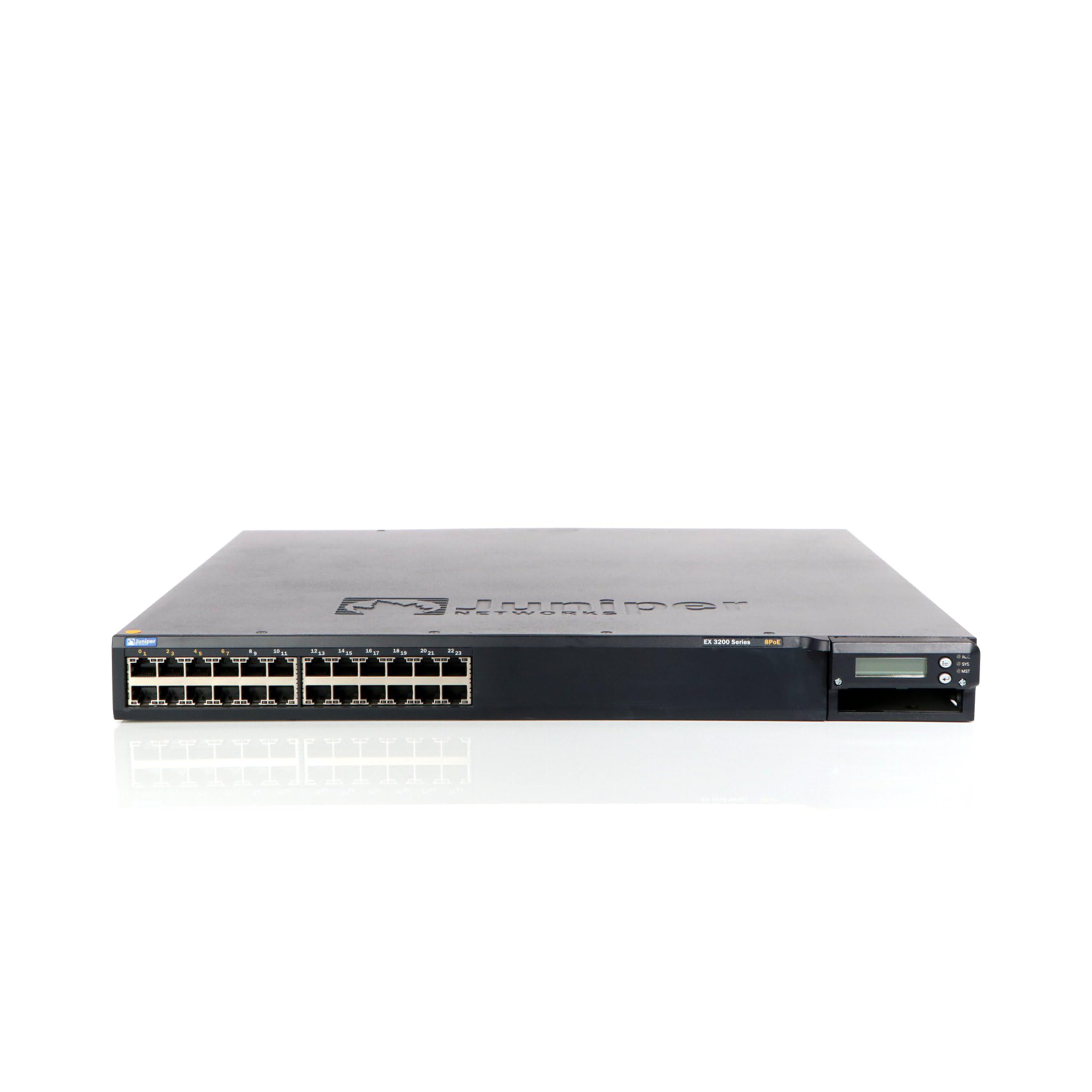
الشكل 1: الجبهة view of the Juniper EX3200-24T Layer 3 Switch. This image displays the 24 Ethernet ports, along with various status indicator lights and the Juniper Networks branding.
2. الإعداد
Follow these steps to properly set up your Juniper EX3200-24T switch.
2.1 فك العبوة والتفتيش
- قم بإزالة المفتاح بعناية من عبوته.
- Inspect the switch for any signs of physical damage. If damage is found, contact your vendor immediately.
- تأكد من وجود جميع المكونات المدرجة في قائمة التعبئة.
2.2 تركيب الرف (اختياري)
The EX3200-24T can be mounted in a standard 19-inch equipment rack. Use the provided rack-mount kit and follow the instructions included with the kit for secure installation.
2.3 توصيل الطاقة
- Ensure the power switch on the rear panel of the switch is in the OFF position.
- Connect the provided AC power cord to the power inlet on the rear of the switch.
- قم بتوصيل الطرف الآخر من سلك الطاقة بمأخذ كهربائي مؤرض.
2.4 توصيل كابلات الشبكة
Connect Ethernet cables from your network devices (computers, servers, other switches) to the 10/100/1000Base-T ports on the front panel of the EX3200-24T switch. Ensure cables are securely seated.
3. تعليمات التشغيل
This section outlines the basic operation of the Juniper EX3200-24T switch.
3.1 تشغيل المفتاح
After connecting the power cord, flip the power switch on the rear panel to the ON position. The system status LEDs on the front panel will illuminate during the boot process.
3.2 Understanding Status LEDs
The front panel features various LEDs to indicate the operational status of the switch and its ports:
- مؤشر LED: Indicates system status (e.g., green for normal operation, amber for warning, red for critical error).
- ألم LED: يشير إلى حالة التنبيه.
- PPM LED: Indicates power supply module status.
- مصابيح LED للمنفذ: Each port has LEDs indicating link status and activity (e.g., green for link, blinking green for activity).
3.3 Initial Configuration (Console Access)
لإعداد الجهاز مبدئيًا، قم بتوصيل كابل وحدة التحكم (RJ-45 إلى DB-9) من محطة العمل الإدارية إلى منفذ وحدة التحكم في المحول. استخدم برنامج محاكاة طرفية (مثل PuTTY أو Tera Term) بالإعدادات التالية:
- معدل باود: 9600
- بتات البيانات: 8
- التكافؤ: لا يوجد
- بتات التوقف: 1
- التحكم في التدفق: لا يوجد
Refer to the Juniper Networks documentation for detailed configuration procedures.
4. الصيانة
Regular maintenance ensures optimal performance and longevity of your EX3200-24T switch.
4.1 التنظيف
- قم بتنظيف الجزء الخارجي من المفتاح بشكل دوري باستخدام قطعة قماش ناعمة وجافة وخالية من الوبر.
- Ensure ventilation openings are free from dust and obstructions to prevent overheating. Do not use liquid or aerosol cleaners directly on the switch.
4.2 تحديثات البرامج الثابتة
Juniper Networks periodically releases firmware updates to improve performance, add features, and address security vulnerabilities. It is recommended to keep the switch firmware updated. Refer to the official Juniper Networks support webالموقع للحصول على أحدث البرامج الثابتة وإجراءات التحديث.
4.3 الاعتبارات البيئية
Operate the switch within its specified environmental limits (temperature, humidity) to prevent damage and ensure reliable operation. Avoid exposing the switch to direct sunlight, excessive heat, or moisture.
5. استكشاف الأخطاء وإصلاحها
This section provides solutions to common issues you might encounter with your EX3200-24T switch.
5.1 لا يوجد طاقة
- علامة مرض: No LEDs are illuminated, and the switch does not power on.
- فعل:
- تأكد من توصيل سلك الطاقة بشكل آمن بالمفتاح والمأخذ الكهربائي.
- تأكد من أن مفتاح الطاقة الموجود على اللوحة الخلفية في وضع التشغيل.
- Check the electrical outlet with another device to confirm it is functional.
- If using a power strip or UPS, ensure it is powered on and functioning correctly.
5.2 عدم وجود اتصال بالشبكة
- علامة مرض: Devices connected to the switch cannot access the network.
- فعل:
- Check the port LEDs on the switch for the connected device. A solid green LED indicates a link. If no link, try a different port or cable.
- Verify the network cable is securely connected at both ends (switch and device).
- Ensure the connected device's network adapter is enabled and configured correctly.
- If multiple devices are affected, check the uplink connection from the EX3200-24T to your core network.
- Consult the switch's configuration for VLANs, IP addressing, and other network settings.
5.3 System Alarm LED (ALM) is Amber/Red
- علامة مرض: The ALM LED is illuminated amber or red.
- فعل:
- Log in to the switch via the console or network management interface.
- Check system logs and alarm messages for details on the specific issue.
- Common causes include power supply issues, fan failures, or high temperature.
- Address the root cause as indicated by the logs.
6. المواصفات
Key technical specifications for the Juniper EX3200-24T Layer 3 Switch:
| ميزة | مواصفة |
|---|---|
| ماركة | جونيبر نتوركس |
| رقم الموديل | EX3200-24T |
| عدد المنافذ | 24 (16 x 10/100/1000Base-T, 8 x 10/100/1000Base-T) |
| فتحة التوسعة | 1 x Expansion Slot |
| معدل نقل البيانات | 1 جيجابت في الثانية |
| دعم الطبقة | الطبقة 3 |
| وزن العنصر | 14.9 رطل |
| لون | أسود |
| الأجهزة المتوافقة | سطح المكتب |
| رمز المنتج الموحد | 832938037793 |
7. الضمان والدعم
7.1 ضمان المنتج
The Juniper EX3200-24T Layer 3 Switch is covered by a standard manufacturer's warranty. For detailed information regarding warranty terms, duration, and coverage, please refer to the warranty card included with your product or visit the official Juniper Networks webموقع.
7.2 الدعم الفني
For technical assistance, troubleshooting beyond this manual, or to report issues, please contact Juniper Networks technical support. Support resources, including documentation, FAQs, and contact information, are available on the official Juniper Networks support portal: