
مقدمة
The 3Dconnexion SpaceNavigator 3D Mouse is a USB navigation device designed for intuitive control within 3D applications. It enhances the user experience by allowing simultaneous manipulation of camera views and models, facilitating intricate adjustments such as changing direction, zooming, and rotating without interruption. This device is compatible with a wide range of 3D applications across Windows, Mac, and Linux operating systems.

الشكل 1: من أعلى إلى أسفل view of the 3Dconnexion SpaceNavigator 3D Mouse.
المميزات الرئيسية:
- Advanced 6 degrees-of-freedom optical sensor for precise control.
- Enables simultaneous pan, zoom, and rotate functionality for 3D models.
- Equipped with 2 programmable function keys for customized shortcuts.
- Includes a commercial use license and full technical support.
- Optimized for 3D designers, CAD engineers, and architects.
يثبت
To set up your 3Dconnexion SpaceNavigator 3D Mouse, follow these steps:
- قم بتوصيل الجهاز: Plug the USB cable of the SpaceNavigator into an available USB port on your computer.
- تثبيت برامج التشغيل: The necessary drivers for your operating system (Windows, Mac, or Linux) are typically installed automatically. If not, please visit the official 3Dconnexion website to download and install the latest drivers for your specific model.
- تكوين البرنامج: After driver installation, the 3Dconnexion software will allow you to customize settings, including sensitivity, button assignments, and application-specific profiles.
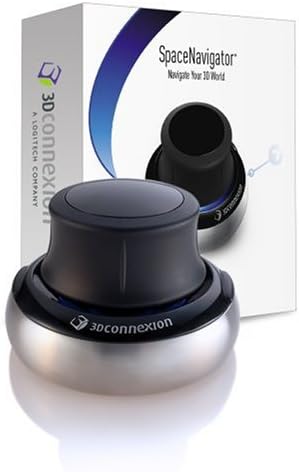
Figure 2: The SpaceNavigator 3D Mouse as it appears in its packaging.
تعليمات التشغيل
The SpaceNavigator utilizes a spring-mounted, pressure-sensitive controller cap to provide 6 degrees-of-freedom (6DoF) navigation. This allows for intuitive control of 3D environments and models.

Figure 3: A user's hand demonstrating interaction with the SpaceNavigator's controller cap.
الملاحة الأساسية:
- بان: Gently push the cap forward, backward, left, or right to move your model or camera view along the X and Y axes.
- تكبير: Pull the cap upwards to zoom out, or push it downwards to zoom in.
- تناوب: Twist the cap clockwise or counter-clockwise to rotate your model or camera view around its Z-axis.
- الإمالة: Tilt the cap forward, backward, left, or right to tilt your model or camera view, allowing you to look up, down, or sideways.
The unique design allows for combining these movements simultaneously, providing a fluid and efficient navigation experience. For example, you can pan and zoom at the same time, or rotate while tilting.

Figure 4: The SpaceNavigator used in conjunction with a standard mouse for dual-hand workflow.
الأزرار القابلة للبرمجة:
The SpaceNavigator includes two programmable function keys. These can be customized via the 3Dconnexion software to execute frequently used commands or macros within your applications, further streamlining your workflow.
عرض فيديو:
Video 1: A demonstration of the 3Dconnexion SpaceNavigator's navigation capabilities within a 3D environment, showcasing pan, zoom, and rotate functions.
صيانة
To ensure the longevity and optimal performance of your SpaceNavigator, follow these general maintenance guidelines:
- تنظيف: Use a soft, dry, lint-free cloth to clean the device. For stubborn dirt, a slightly damp يمكن استخدام القماش، ولكن تأكد من عدم دخول الرطوبة إلى الجهاز.
- تجنب السوائل: Do not immerse the device in water or any cleaning solutions. Avoid spraying cleaners directly onto the device.
- تخزين: Store the SpaceNavigator in a clean, dry environment when not in use to prevent dust accumulation and potential damage.
استكشاف الأخطاء وإصلاحها
If you encounter issues with your 3Dconnexion SpaceNavigator, consider the following troubleshooting steps:
- فحص الاتصال: Ensure the USB cable is securely plugged into both the SpaceNavigator and your computer. Try a different USB port.
- Driver Verification: Confirm that the latest 3Dconnexion drivers are installed. Reinstalling drivers can often resolve software-related issues.
- توافق التطبيق: Verify that your 3D application officially supports 3Dconnexion devices. Check the application's settings for 3D mouse integration.
- إعادة تشغيل: Restart your computer and the 3D application.
For further assistance, refer to the Support section below.
تحديد
| ميزة | التفاصيل |
|---|---|
| أبعاد المنتج | 3 × 3 × 2 بوصة |
| وزن العنصر | 1.06 رطل (479 جرام) |
| رقم الموديل | 3 DX-700028 |
| الاتصال | USB (سلكي) |
| درجات الحرية | 6DoF (Pan, Zoom, Rotate, Tilt) |
| مفاتيح قابلة للبرمجة | 2 |
| التوافق | ويندوز، ماك، لينكس |
| تاريخ أول توفر | 28 نوفمبر 2006 |
| الشركة المصنعة | اتصال ثلاثي الأبعاد |
الضمان والدعم
The 3Dconnexion SpaceNavigator SE model includes a commercial use license and full technical support. For detailed warranty information, product registration, and access to support resources, please visit the official 3Dconnexion webالموقع أو الاتصال بخدمة العملاء الخاصة بهم.
الدعم عبر الإنترنت: www.3dconnexion.com/support