
1. المقدمة
The Sigma SD14 is a 14-megapixel Digital Single-Lens Reflex (DSLR) camera designed for advanced photographers. It features the Foveon X3 direct-image sensor, which captures full RGB color information at each pixel layer, aiming for high-definition images with rich gradation. This manual provides essential information for setting up, operating, and maintaining your SD14 camera.
Key features include a 2.5-inch LCD monitor, a durable shutter mechanism rated for over 100,000 cycles, a 5-point autofocus system, and continuous shooting capabilities. The camera supports both RAW and JPEG image recording formats and includes Sigma Photo Pro 3.0 software for RAW image processing.

الشكل 1.1: الجبهة view of the Sigma SD14 Digital SLR Camera, showing the lens mount and body design.
2. ماذا يوجد في الصندوق
Verify that all the following items are included in your Sigma SD14 package:
- Sigma SD14 Digital SLR Camera Body
- Lithium-ion Power Battery BP-21
- Battery Charger BC-21
- كابل يو اس بي
- مرئيات
- حزام الرقبة
- Eye Cap
- غطاء الجسم
- غطاء العدسة
- SIGMA Photo Pro 3.0 CD-ROM
- SD14 Instruction Manual (this document)
3. الإعداد
3.1. شحن البطارية وتركيبها
- Insert the Lithium-ion Battery BP-21 into the Battery Charger BC-21.
- قم بتوصيل الشاحن بمأخذ الطاقة. سيضيء مؤشر الشحن.
- Charging typically takes approximately 120 minutes for a full charge.
- بمجرد الشحن الكامل ، أخرج البطارية من الشاحن.
- Open the battery compartment cover on the camera body.
- Insert the charged battery into the compartment, ensuring correct orientation.
- أغلق غطاء حجرة البطارية جيدًا.
A fully charged BP-21 battery can capture approximately 500 images.
3.2. إدخال بطاقة الذاكرة
The SD14 uses CompactFlash (CF) Type I/II cards. Ensure the card is formatted in the camera before first use.
- Open the CF card slot cover on the side of the camera.
- Insert the CF card with the correct orientation until it clicks into place.
- Close the CF card slot cover securely.
3.3. تركيب العدسة
The Sigma SD14 uses the Sigma SA Bayonet mount. Only Sigma SA mount lenses are directly compatible.
- قم بإزالة غطاء الجسم من الكاميرا وغطاء العدسة الخلفية من العدسة.
- Align the red index mark on the lens with the red index mark on the camera body's lens mount.
- قم بتثبيت العدسة عن طريق تدويرها في اتجاه عقارب الساعة حتى يتم قفلها في مكانها بنقرة.
- لإزالة العدسة، اضغط على زر تحرير العدسة الموجود على جسم الكاميرا وقم بتدوير العدسة عكس اتجاه عقارب الساعة.
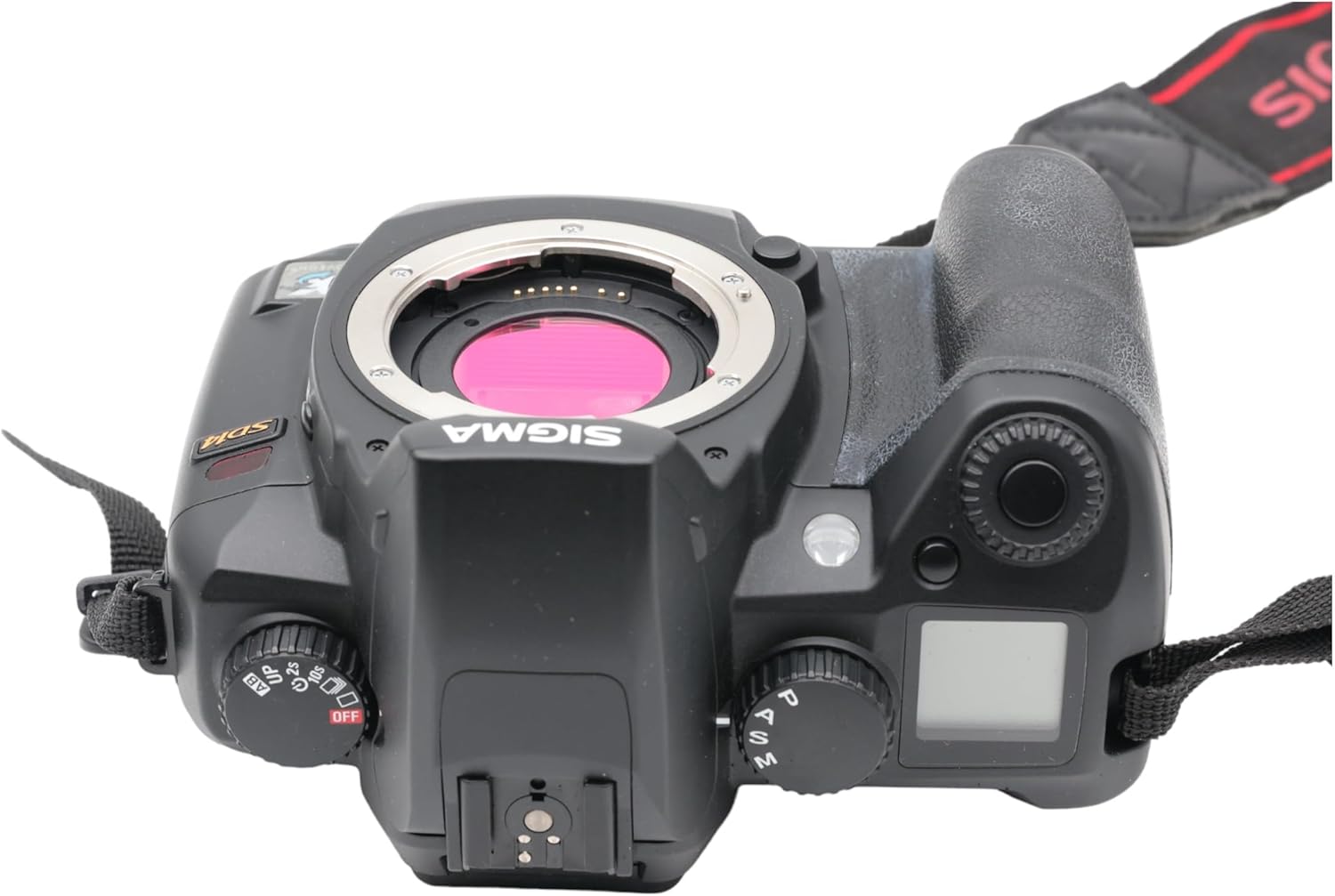
الشكل 3.1: الجزء العلوي view of the Sigma SD14, illustrating the lens mount and mode dials.
4. التشغيل
4.1. تشغيل / إيقاف التشغيل
Rotate the power switch to the ON position to turn on the camera. Rotate it to OFF to power down.
4.2. عناصر التحكم الأساسية والشاشة
The SD14 features a 2.5-inch LCD monitor for reviewing images and navigating menus, and a pentaprism viewfinder for composing shots. The top LCD panel displays key settings such as resolution, metering mode, battery status, and remaining shots.

الشكل 4.1: خلفي view of the Sigma SD14, showing the LCD monitor, viewأزرار البحث والتحكم.
Key buttons include MENU, ISO, WB (White Balance), and a 4-way controller with an OK button for navigation. The INFO button displays shutter speed, aperture, and other settings on the LCD.
4.3. التركيز
The camera utilizes a 5-point autofocus (AF) system (center, left, right, up, and down). The center AF point features a cross-type sensor for enhanced precision. AF point selection can be automatic or manual.
4.4. أوضاع القياس
The SD14 offers three metering modes:
- 8-segment Evaluative Metering: Analyzes the entire scene for balanced exposure.
- Center Area Metering: يعطي الأولوية للمنطقة المركزية من الإطار.
- Center Weighted Average Metering: Measures the entire frame but gives more weight to the central area.
Exposure compensation and auto bracketing functions are available for fine-tuning exposure.
4.5. تسجيل الصور
The camera supports both RAW (X3F) and JPEG formats. JPEG recording offers four sizes (Super High, High, Medium, Low) and three quality settings (Fine, Normal, Basic).
- Super High (4608 x 3072 pixels): Suitable for A3 or larger prints.
- High (2640 x 1760 pixels): Suitable for A4 prints.
- Medium (1776 x 1184 pixels): Suitable for regular size prints.
- Low (1296 x 864 pixels): مناسب ل web pages and email.
4.6. التصوير المستمر
The SD14 can shoot continuously at 3 frames per second. The number of frames captured in a burst depends on the resolution setting:
- عالي: 6 إطارًا
- واسطة: 12 إطارًا
- قليل: 24 إطارًا
These figures apply to both RAW and JPEG modes.
4.7. فلاش مدمج
The built-in flash has a guide number of 11 (ISO 100) and covers a 17mm lens angle (28mm equivalent on 35mm format). It supports S-TTL automatic flash metering and can synchronize with shutter speeds up to 1/180 second.
4.8. Mirror Lock-up
Activate the mirror lock-up mechanism to prevent camera shake caused by mirror movement during exposure. This is particularly useful for macro photography, long telephoto shots, or scientific applications. For best results, use with a remote controller or cable release (sold separately).
4.9. Sigma Photo Pro 3.0 Software
The included Sigma Photo Pro 3.0 software is a RAW image developer. It allows for quick conversion of RAW data and offers three adjustment modes: X3F Mode (original settings), Auto Adjustment Mode, and Custom Mode for manual adjustments (exposure, contrast, shadow, highlight, saturation, sharpness, fill-light). The software supports 8-bit TIFF, 16-bit TIFF, and JPEG file formats, and sRGB, Apple RGB, Adobe RGB, and ColorMatch RGB color spaces.
5. الصيانة
5.1. Image Sensor Dust Protector
The SD14 features a dust protector positioned in front of the image sensor. This design prevents dust from adhering directly to the sensor, minimizing its impact on image quality. If dust accumulates on the protector, it will be out of focus and generally not visible in images.
5.2. تنظيف جسم الكاميرا والعدسة
- استخدم قطعة قماش ناعمة وخالية من الوبر لمسح جسم الكاميرا. لإزالة الأوساخ العنيدة، امسحها برفق.ampen قطعة القماش بالماء أو محلول تنظيف لطيف.
- For lenses, use a lens brush to remove loose dust, then a lens cleaning solution and a microfiber cloth. Avoid touching the lens surface with your fingers.
- لا تستخدم أبدًا المذيبات العضوية مثل مخفف الطلاء أو البنزين لتنظيف الكاميرا أو العدسة.
5.3. العناية بالبطارية
- قم بتخزين البطاريات في مكان بارد وجاف عندما لا تكون قيد الاستعمال.
- تجنب تفريغ البطارية بالكامل بشكل متكرر لإطالة عمرها.
- إذا لم يتم استخدام الكاميرا لفترة طويلة، قم بإزالة البطارية.
6. استكشاف الأخطاء وإصلاحها
| مشكلة | السبب المحتمل | حل |
|---|---|---|
| الكاميرا لا تعمل. | تم استنزاف البطارية أو إدخالها بشكل غير صحيح. | قم بشحن البطارية بالكامل وتأكد من إدخالها بشكل صحيح. |
| الصور ضبابية. | التركيز غير الصحيح، أو اهتزاز الكاميرا، أو العدسة المتسخة. | تأكد من ضبط التركيز بشكل صحيح. استخدم سرعة غالق أسرع أو حامل ثلاثي القوائم. نظف العدسة. |
| الصور إما داكنة جداً أو ساطعة جداً. | Incorrect exposure settings or metering mode. | Adjust exposure compensation. Select an appropriate metering mode for the scene. |
| Color blotching in underexposed areas. | Characteristic of the Foveon sensor when severely underexposed. | Aim to slightly overexpose images (e.g., +.7 EV) to retain shadow detail and avoid this effect. |
| لا يمكن تسجيل الصور. | Memory card is full, locked, or not inserted correctly. | Insert an empty card, unlock the card, or reinsert it correctly. Format the card if necessary (this will erase all data). |
| تتجمد الكاميرا أو تصبح غير مستجيبة. | خلل مؤقت في البرنامج. | قم بإزالة البطارية ثم أعد إدخالها لإعادة ضبط الكاميرا. |
For more detailed troubleshooting or error codes, please refer to the comprehensive instruction manual included with your camera or visit the Sigma support webموقع.
7. المواصفات
| ميزة | التفاصيل |
|---|---|
| اسم الموديل | SD14 |
| دقة مستشعر الصورة | 14 MP (Foveon X3 direct-image sensor) |
| حجم مستشعر الصور | APS-C |
| حوامل متوافقة | Sigma SA Bayonet |
| مدعوم File التنسيقات | JPEG, RAW (X3F), TIFF |
| حجم الشاشة | 2.5 Inches (150,000 pixels) |
| Viewمكتشف | Optical Pentaprism (98% coverage, 0.9x magnification) |
| نقاط ضبط تلقائي للصورة | 5-point (Phase Detection) |
| سرعة التصوير المستمر | 3 إطارًا في الثانية |
| الحد الأقصى لسرعة الغالق | 1/4000 ثانية |
| الحد الأدنى لسرعة الغالق | ثانيتين |
| نطاق ISO الموسع | 100 - 1600 |
| أوضاع القياس | 8-segment Evaluative, Center Area, Center Weighted Average |
| Built-in Flash Guide Number | 11 (أيزو 100) |
| وسائط التخزين | Compact Flash (CF) Type I/II |
| مصدر الطاقة | Lithium-ion Battery BP-21 |
| الاتصال | USB، مخرج فيديو |
| وزن العنصر | 1.65 رطل (حوالي 748 جرام) |
| رقم الموديل | سي23900 |
| رمز المنتج الموحد | 085126924416 |
7.1. Optional Accessories (Sold Separately)
- Sigma Lenses (over 40 compatible models)
- Flashguns: EF-500 DG SUPER, EF-500 DG ST, EM-140 DG
- Power Grip PG-21
- Cable Release CR-21
- Remote Controller RS-31
- AC Adapter SAC-21
8. الضمان والدعم
8.1. معلومات الضمان
For detailed warranty terms and conditions, please refer to the warranty card included with your product or visit the official Sigma webالموقع. تغطي الضمانة عادةً عيوب المواد والتصنيع لفترة محددة من تاريخ الشراء.
8.2. دعم العملاء
If you encounter any issues or have questions not covered in this manual, please contact Sigma customer support. Contact information can usually be found on the official Sigma webالموقع أو في وثائق الضمان.
الموارد المتاحة على الإنترنت: Visit the official Sigma website for product registration, firmware updates, FAQs, and additional support resources.