
1. المقدمة
The Behringer Minimix Mix800 is an ultra-compact karaoke machine designed for studio and stage applications. It features a revolutionary Voice Canceller, an integrated digital echo/reverb processor, two independent microphone channels, and a dedicated 2-band EQ for vocal enhancement.
2. تعليمات السلامة
- مزود الطاقة: استخدم محول الطاقة المحدد فقط. مستوى الصوت غير صحيحtagقد يؤدي ذلك إلى إتلاف الوحدة وإبطال الضمان.
- رُطُوبَة: Do not expose the unit to rain or moisture. Avoid placing liquids near the device.
- تهوية: تأكد من التهوية الكافية. لا تسد فتحات التهوية.
- الخدمة: لا تحاول صيانة الجهاز بنفسك. قم بإحالة جميع أعمال الصيانة إلى فنيين مؤهلين.
- تنظيف: نظف فقط بقطعة قماش جافة.
3. عناصر التحكم والموصلات
3.1 اللوحة الأمامية

الشكل 1: اللوحة الأماميةview of the Minimix Mix800
- MIC LEVEL 1 & 2: Rotary controls to adjust the input level for Microphone Input 1 and 2.
- CLIP Indicators: Red LEDs that illuminate when the input signal is too high, indicating potential clipping. Reduce the MIC LEVEL if these light up.
- MIC INPUT 1 & 2: 1/4-inch TS jack inputs for connecting microphones.
- EQ HIGH: Adjusts the high-frequency content of the microphone signals.
- معادل منخفض: Adjusts the low-frequency content of the microphone signals.
- مستوى العملات الأجنبية: Controls the amount of echo/reverb effect applied to the microphone signals.
- ECHO/REVERB Button: Activates or deactivates the integrated digital effects processor.
- 24 BIT Indicator: Lights up when the 24-bit digital effects processor is active.
- VOICE CANCELLER Button: Activates or deactivates the voice canceller function.
- IN/OUT Indicator: Lights up when the main output is active.
- مستوى الإخراج: Rotary control to adjust the overall output volume of the Mix800.
- CLIP Meter: LED meter displaying the output signal level. Aim for levels around 0 dB for optimal performance without clipping.
- زر الطاقة: يقوم بتشغيل الوحدة أو إيقاف تشغيلها.
3.2 اللوحة الخلفية
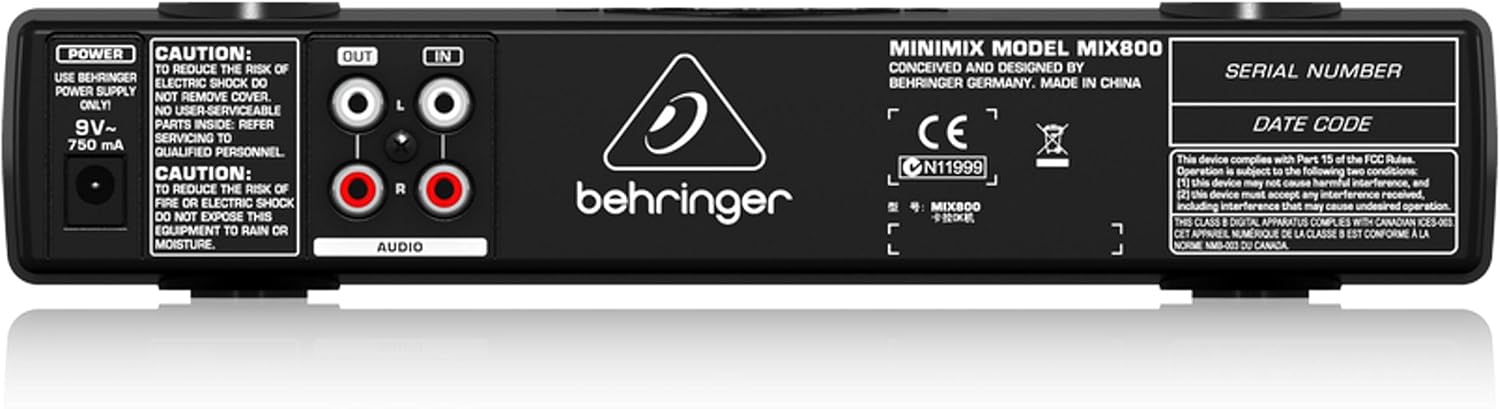
الشكل 2: اللوحة الخلفيةview of the Minimix Mix800
- مدخل الطاقة: Connection for the external 9V~ 750mA power adapter.
- مخرج الصوت (يسار/يمين): RCA outputs for connecting the Mix800 to an amplifier, powered speakers, or a recording device.
- AUDIO IN (L/R): RCA inputs for connecting an external audio source, such as a CD player, media player, or computer.
4. الإعداد
Follow these steps to set up your Behringer Minimix Mix800:
- توصيل مصدر الصوت: Connect your external audio source (e.g., CD player, computer, smartphone) to the AUDIO IN (L/R) RCA inputs on the rear panel using appropriate RCA cables.
- توصيل المخرج: قم بتوصيل مخرج الصوت (يسار / يمين) RCA outputs on the rear panel to your amplifier, powered speakers, or sound system using RCA cables.
- توصيل الميكروفونات: Plug your microphones into the إدخال الميكروفون 1 و إدخال الميكروفون 2 1/4-inch jacks on the front panel.
- توصيل الطاقة: Connect the supplied 9V~ 750mA power adapter to the قوة input on the rear panel, then plug the adapter into a suitable power outlet.
- تشغيل الطاقة: اضغط على قوة button on the front panel to turn on the Mix800.
5. تعليمات التشغيل
Once set up, you can begin using your Minimix Mix800:
- Adjust Microphone Levels: Speak into your microphones and slowly turn up the MIC LEVEL 1 و MIC LEVEL 2 controls. Adjust until the sound is clear and loud, but ensure the مقطع indicators do not light up consistently. Occasional flashes are acceptable.
- اضبط معادل الصوت: استخدم EQ عالية و EQ LOW controls to shape the tone of your vocals. Increase EQ HIGH for brighter vocals, and EQ LOW for more warmth or bass.
- تطبيق التأثيرات: اضغط على ECHO/REVERB button to activate the digital effects. Adjust the مستوى العملات الأجنبية knob to control the amount of echo or reverb added to your vocals.
- Use Voice Canceller: اضغط على جهاز إلغاء الصوت button to attempt to remove vocals from the incoming stereo audio source. Note that the effectiveness of this feature can vary depending on the original audio track.
- Set Output Level: ضبط مستوى الإخراج knob to control the overall volume sent to your sound system. Monitor the CLIP Meter لمنع التشويه.
6. الصيانة
- تنظيف: Disconnect the power before cleaning. Use a soft, dry cloth to wipe the exterior of the unit. Do not use liquid cleaners or solvents.
- تخزين: When not in use for extended periods, store the unit in a dry, dust-free environment.
- العناية بالكابلات: Ensure all cables are free from kinks or damage. Avoid pulling cables forcefully from their connectors.
7. استكشاف الأخطاء وإصلاحها
| مشكلة | السبب المحتمل | حل |
|---|---|---|
| لا يوجد مخرج صوت | Power off; incorrect connections; output level too low; ampمكبر الصوت قبالة. | Check power, all cable connections (input/output), increase OUTPUT LEVEL, ensure ampتم تشغيل المحرك. |
| الميكروفون لا يعمل | Mic level too low; faulty microphone/cable; mic not fully inserted. | Increase MIC LEVEL, test with another microphone/cable, ensure mic cable is fully inserted and making proper contact. |
| صوت مشوه | Input/output levels too high (clipping). | Reduce MIC LEVEL or OUTPUT LEVEL until CLIP indicators/meter no longer show consistent clipping. |
| Voice Canceller ineffective | Original audio track not suitable for voice cancellation. | The effectiveness varies greatly with the source material. This is a characteristic of the technology. |
8. المواصفات
| ميزة | التفاصيل |
|---|---|
| اسم الموديل | MINIMIX MIX800 |
| أبعاد العنصر (الطول × العرض × الارتفاع) | 9.55 بوصة × 4.72 بوصة × 1.89 بوصة |
| وزن العنصر | 1.3 رطل |
| مدخلات الميكروفون | 2 x 1/4" TS Jacks |
| المدخلات الصوتية | ار سي ايه (يسار/يمين) |
| مخرجات الصوت | ار سي ايه (يسار/يمين) |
| التأثيرات | Digital Echo/Reverb (24-bit) |
| معادلة | 2-band (High, Low) |
| مزود الطاقة | 9V~ 750mA (external adapter) |
9. فيديو المنتج الرسمي
Video 1: Manufacturer's overview of the Behringer Minimix Mix800, demonstrating its features and capabilities.
10. الضمان والدعم
للحصول على معلومات مفصلة حول الضمان، يرجى الرجوع إلى موقع Behringer الرسمي. webموقع: http://www.music-group.com/warranty.aspx. For technical support or service inquiries, please contact Behringer customer service.