
1. المقدمة
شكرا لك على الشراءasing the GPX CDP6806DT Personal CD Player. This manual provides important safety instructions, operational guidelines, and maintenance procedures to ensure optimal performance and longevity of your device. Please read this manual thoroughly before using the product and retain it for future reference.
2. معلومات السلامة
تعليمات السلامة الهامة
- لا تعرض الوحدة للماء أو الرطوبة.
- تجنب وضع الوحدة بالقرب من مصادر الحرارة مثل المشعات أو أجهزة التدفئة أو المواقد أو الأجهزة الأخرى (بما في ذلك ampالمُضخِّمات) التي تنتج الحرارة.
- Do not attempt to disassemble or modify the unit. Refer all servicing to qualified service personnel.
- Use only the specified batteries (2 x AA batteries). Ensure correct polarity when inserting batteries.
- قم بإزالة البطاريات إذا لم يتم استخدام الوحدة لفترة طويلة.
- تجنب الاستماع بمستويات صوت عالية لفترات طويلة لمنع تلف السمع.
- نظف الوحدة بقطعة قماش جافة فقط.
3. محتويات العبوة
Carefully unpack your GPX CDP6806DT Personal CD Player and ensure all items are present:
- GPX CDP6806DT Personal CD Player
- دليل المستخدم (هذا المستند)
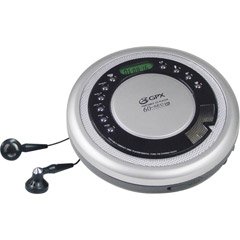
Figure 1: GPX CDP6806DT Personal CD Player. This image illustrates the compact design and general appearance of the device.
4. عناصر التحكم والميزات
Familiarize yourself with the controls and features of your GPX CDP6806DT for optimal use.
- شاشة LCD: 6-digit display for track number, time, and FM frequency.
- تشغيل/إيقاف مؤقت (►/−): Press to start or pause CD playback.
- توقف (■): Press to stop CD playback.
- SKIP/SEARCH (◀◀/▶▶): Press to skip tracks. Hold to search within a track.
- مستوى الصوت (+/-): يضبط مستوى إخراج الصوت.
- MODE/PROG: Selects playback mode (Repeat, Random) or programs CD tracks.
- FM TUNER (ON/OFF/BAND): Switches to FM radio mode, turns FM on/off, or changes FM band.
- PRESET (+/-): Navigates saved FM radio presets.
- حجرة الأقراص المضغوطة: Area for inserting audio CDs.
- حجرة البطارية: Located on the bottom, holds 2 AA batteries.
- مقبس سماعة الرأس (3.5،XNUMX ملم): يوصل سماعات الرأس للاستماع الخاص.
Figure 2: GPX CDP6806DT Controls Layout. This image provides a visual reference for the location of various buttons and ports on the device.
5. الإعداد
5.1 تركيب البطارية
The GPX CDP6806DT requires two (2) AA batteries (not included) for portable operation.
- حدد مكان حجرة البطارية في الجزء السفلي من الوحدة.
- حرك غطاء حجرة البطارية لفتحه.
- أدخل بطاريتين من نوع AA، مع التأكد من القطبية الصحيحة (+ و -) كما هو موضح داخل الحجرة.
- أغلق غطاء حجرة البطارية جيدًا.
5.2 توصيل سماعات الرأس
For private listening, connect your 3.5mm stereo headphones (not included) to the headphone jack located on the side of the unit.
6. تعليمات التشغيل
تشغيل أقراص مضغوطة 6.1
The unit supports CD and CD-R/RW disc formats.
- Open the CD compartment lid by gently pressing the OPEN button (if present, or lifting the lid).
- ضع قرصًا مضغوطًا بحيث يكون جانب الملصق متجهًا لأعلى على محور القرص المركزي.
- أغلق غطاء حجرة الأقراص المدمجة بإحكام حتى تسمع صوت طقطقة.
- اضغط على تشغيل/إيقاف مؤقت (►/−) button to begin playback. The track number and elapsed time will appear on the LCD display.
- لإيقاف التشغيل مؤقتًا ، اضغط على تشغيل/إيقاف مؤقت (►/−). اضغط مرة أخرى للاستئناف.
- لإيقاف التشغيل ، اضغط على قف (■) زر.
- للانتقال إلى المسار التالي، اضغط على SKIP/SEARCH (▶▶).
- To go back to the beginning of the current track, press SKIP/SEARCH (◀◀) once. Press twice to go to the previous track.
- To search rapidly forward or backward within a track, hold down SKIP/SEARCH (▶▶) or (◀◀) على التوالى.
- اضبط مستوى الصوت باستخدام ملف الحجم (+/-) ضوابط.
تشغيل راديو 6.2 FM
The unit features a digital FM tuner with station presets.
- حرك موالف FM switch to the ON position or press the فرقة الزر للدخول إلى وضع FM.
- اضغط على SKIP/SEARCH (▶▶) or (◀◀) أزرار لضبط التردد المطلوب يدويًا.
- To auto-scan and save stations, hold down the تشغيل/إيقاف مؤقت (►/−) button (or refer to specific instructions for auto-scan if available on the device).
- To recall saved presets, use the الإعداد المسبق (+/-) أزرار.
6.3 CD Programming (24-Track)
يمكنك برمجة ما يصل إلى 24 مقطعًا موسيقيًا لتشغيلها بترتيب محدد.
- مع إيقاف تشغيل القرص المضغوط، اضغط على MODE/PROG زر. ستومض كلمة "PROG" على الشاشة.
- استخدم SKIP/SEARCH (▶▶) or (◀◀) buttons to select the first track you wish to program.
- يضعط MODE/PROG again to confirm the selection. The display will show the program number and the next available program slot.
- كرر الخطوتين 2 و 3 لإضافة ما يصل إلى 24 مسارًا إلى برنامجك.
- بعد برمجة جميع المسارات المطلوبة، اضغط تشغيل/إيقاف مؤقت (►/−) لبدء التشغيل المبرمج.
- To clear the program, press the قف (■) اضغط على الزر مرتين.
6.4 الحماية من التخطي (ASP)
The GPX CDP6806DT features a 60-second Anti-Skip Protection system. This system buffers audio data to minimize interruptions caused by minor shocks or vibrations during CD playback. The ASP activates automatically when a CD is playing.
7. الصيانة
7.1 تنظيف الوحدة
- امسح الجزء الخارجي من الوحدة بقطعة قماش ناعمة وجافة.
- لا تستخدم المنظفات الكاشطة أو الشمع أو المذيبات.
- If the CD lens needs cleaning, use a specialized CD lens cleaner disc or a soft, lint-free cloth designed for optical lenses.
7.2 العناية بالبطارية
- Remove batteries if the unit is not used for an extended period to prevent leakage.
- لا تخلط بين البطاريات القديمة والجديدة أو أنواع مختلفة من البطاريات.
- تخلص من البطاريات المستعملة بطريقة مسؤولة وفقًا للوائح المحلية.
8. استكشاف الأخطاء وإصلاحها
If you experience issues with your GPX CDP6806DT, please consult the following table for common problems and solutions.
| مشكلة | السبب المحتمل / الحل |
|---|---|
| الوحدة لا تعمل بالطاقة. | Check if batteries are inserted correctly with proper polarity. Ensure batteries are fresh and not depleted. |
| لا يوجد صوت من سماعات الرأس. | Ensure headphones are fully plugged into the headphone jack. Increase the volume level. Test with another pair of headphones. |
| CD skips or playback is interrupted. | Ensure the CD is clean and free of scratches or smudges. Clean the CD with a soft, lint-free cloth. Ensure the unit is on a stable surface or held steadily during use. |
| لا يعمل القرص المضغوط. | Ensure the CD is inserted correctly with the label side up. Close the CD compartment lid completely. Check if the CD is a supported format (CD, CD-R/RW). |
| استقبال الراديو FM ضعيف. | Extend the headphone cable as it acts as the antenna. Try moving to a different location. |
9. المواصفات
- ماركة: جي بي اكس
- نموذج: CDP6806DT
- تنسيقات الأقراص المدعومة: CD ، CD-R / RW
- حماية ضد التخطي: ثانيتين
- عرض: 6 أرقام LCD
- راديو: Digital FM Tuner with Presets
- CD Programming: 24-المسار
- مصدر الطاقة: 2 بطاريات AA (غير متضمنة)
- الاتصال: 3.5mm Headphone Jack (Auxiliary)
10. الضمان والدعم
For detailed warranty information, please refer to the warranty card included with your original product packaging. For technical support, service inquiries, or to purchase replacement parts, please visit the official GPX webقم بزيارة الموقع أو اتصل بقسم خدمة العملاء الخاص بهم باستخدام معلومات الاتصال المقدمة في وثائق المنتج.
يرجى الاحتفاظ بإثبات الشراء الخاص بك لمطالبات الضمان.