
1. المقدمة
شكرا لك على الشراءasing the GPX BCD2004 Boombox. This portable audio system features a top-loading CD player and an AM/FM tuner, designed for versatile audio playback. This manual provides essential information for setting up, operating, and maintaining your device to ensure optimal performance and longevity.
2. معلومات السلامة
- اقرأ التعليمات: Carefully read all operating instructions before using the unit.
- الاحتفاظ بالتعليمات: احتفظ بهذا الدليل للرجوع إليه في المستقبل.
- الماء والرطوبة: Do not expose this appliance to dripping or splashing water. Do not place objects filled with liquids, such as vases, on the appliance.
- تهوية: تأكد من التهوية الجيدة. لا تسد أي فتحات تهوية.
- حرارة: لا تضعه بالقرب من مصادر الحرارة مثل المشعات أو فتحات التدفئة أو المواقد أو الأجهزة الأخرى (بما في ذلك ampالمُضخِّمات) التي تنتج الحرارة.
- مصادر الطاقة: Use only the power source indicated on the appliance.
- البطاريات: Follow battery safety guidelines. Do not mix old and new batteries, or different types of batteries. Remove batteries if the unit is not used for extended periods.
- الخدمة: قم بإحالة جميع أعمال الصيانة إلى موظفي الخدمة المؤهلين.
3. محتويات العبوة
يرجى التأكد من تضمين العناصر التالية في الحزمة الخاصة بك:
- GPX BCD2004 Boombox Unit
- سلك الطاقة المتردد
- دليل المستخدم
4. عناصر التحكم والميزاتview
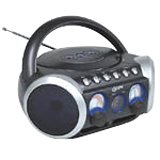
الشكل 1: أمام view of the GPX BCD2004 Boombox. This image shows the overall design of the boombox, including the speaker grilles and the general layout of the front panel.
Familiarize yourself with the main controls and features of your boombox:
- حجرة الأقراص المضغوطة: Top-loading bay for inserting CDs.
- تبديل الوظيفة: Selects between CD, AM, FM, and OFF modes.
- التحكم في مستوى الصوت: Rotary dial to adjust the audio output level.
- ضبط الطلب: Rotary dial for selecting AM or FM radio frequencies.
- زر التشغيل/الإيقاف المؤقت: Starts or temporarily stops CD playback.
- زر التوقف: يوقف تشغيل القرص المضغوط.
- أزرار التخطي/البحث (◀◀ / ▶▶): Skips to the previous/next track or searches within a track.
- زر البرنامج: Used to program a sequence of tracks for CD playback.
- زر التكرار: Repeats the current track or the entire CD.
- هوائي AM/FM: Telescopic antenna for FM reception, internal antenna for AM.
- مدخلات الطاقة AC: Jack for connecting the AC power cord.
- حجرة البطارية: Located on the bottom or rear for 'C' batteries.
- Fold-down Carrying Handle: لسهولة الحمل.
5. الإعداد
5.1 تشغيل الوحدة
Your GPX BCD2004 Boombox can be powered by either AC power or batteries.
تشغيل طاقة التيار المتردد
- Ensure the Function Switch is in the OFF position.
- Insert the small end of the AC power cord into the AC power input jack on the back of the unit.
- قم بتوصيل الطرف الآخر من سلك الطاقة المتردد بمأخذ حائط قياسي للتيار المتردد (120 فولت ~ 60 هرتز).
تشغيل طاقة البطارية
For portable use, the boombox requires 8 'C' size batteries (not included).
- Ensure the Function Switch is in the OFF position.
- Open the battery compartment cover located on the bottom or rear of the unit.
- أدخل 8 بطاريات من الحجم "C"، مع مراعاة القطبية الصحيحة (+ و -) كما هو موضح داخل الحجرة.
- أغلق غطاء حجرة البطارية جيدًا.
- ملحوظة: When operating on battery power, disconnect the AC power cord from the unit.
6. تشغيل مشغل الأقراص المضغوطة
The GPX BCD2004 is compatible with standard audio CDs, CD-R, and CD-RW discs.
6.1 تحميل قرص مضغوط
- Lift the CD compartment door located on the top of the unit.
- ضع القرص المضغوط على محور الدوران المركزي بحيث يكون جانب الملصق متجهًا لأعلى.
- Gently close the CD compartment door until it clicks shut.
6.2 تشغيل الأقراص المدمجة الأساسي
- اضبط مفتاح الوظيفة على وضع القرص المضغوط.
- The CD player will begin to read the disc. The track number will typically display.
- Press the PLAY/PAUSE (▶/██) button to start playback.
- اضبط مستوى الصوت على مستوى الاستماع الذي ترغب فيه.
- To pause playback, press the PLAY/PAUSE (▶/██) button. Press it again to resume.
- To stop playback, press the STOP (■) button.
6.3 Skipping and Searching Tracks
- تخطي المسار: During playback, press the SKIP/SEARCH FORWARD (▶▶) button to go to the next track. Press the SKIP/SEARCH BACKWARD (◀◀) button to go to the beginning of the current track, or press it twice to go to the previous track.
- Search Within Track: During playback, press and hold the SKIP/SEARCH FORWARD (▶▶) or SKIP/SEARCH BACKWARD (◀◀) button to fast forward or rewind through the current track. Release the button to resume normal playback.
6.4 Program Play
يمكنك برمجة ما يصل إلى 16 مقطعًا موسيقيًا لتشغيلها بترتيب محدد.
- In STOP mode, press the PROGRAM button. The program indicator will flash.
- Use the SKIP/SEARCH buttons (◀◀ / ▶▶) to select your desired first track.
- Press the PROGRAM button again to confirm the selection.
- كرر الخطوتين 2 و 3 لإضافة ما يصل إلى 16 مسارًا إلى قائمة برنامجك.
- After programming all desired tracks, press the PLAY/PAUSE (▶/██) button to start programmed playback.
- To clear the program, press the STOP (■) button twice.
6.5 Repeat Play
During CD playback, press the REPEAT button:
- اضغط مرة واحدة لـ كرر 1 (repeats the current track).
- اضغط مرتين لـ كرر الكل (repeats the entire CD or programmed tracks).
- Press a third time to cancel repeat function.
7. تشغيل راديو AM/FM
7.1 Tuning to Radio Stations
- Set the Function Switch to either the AM or FM position.
- Adjust the Tuning Dial to select your desired radio station.
- اضبط مستوى الصوت على مستوى الاستماع الذي ترغب فيه.
7.2 Improving Radio Reception
- استقبال FM: قم بتمديد الهوائي التلسكوبي بالكامل واضبط موضعه للحصول على أفضل استقبال.
- استقبال الصباح: The unit has a built-in AM antenna. Rotate the entire boombox for optimal AM reception.
8. الصيانة
8.1 تنظيف الوحدة
- امسح الجزء الخارجي من الوحدة بقطعة قماش ناعمة دamp القماش. لا تستخدم المنظفات أو المذيبات الكاشطة.
- بالنسبة لعدسة القرص المضغوط، استخدم قرص تنظيف خاص بعدسات الأقراص المضغوطة أو قطعة قماش ناعمة وخالية من الوبر مصممة خصيصًا للعدسات البصرية.
8.2 العناية بالبطارية
- قم بإزالة البطاريات إذا لم يتم استخدام الوحدة لفترة طويلة لمنع التسرب.
- تخلص من البطاريات المستعملة بطريقة مسؤولة وفقًا للوائح المحلية.
9. استكشاف الأخطاء وإصلاحها
إذا واجهت مشاكل مع جهاز الراديو المحمول الخاص بك، فيرجى الرجوع إلى المشاكل والحلول الشائعة التالية:
| مشكلة | السبب المحتمل | حل |
|---|---|---|
| لا يوجد طاقة | AC cord not connected; Batteries dead or incorrectly inserted; Function switch OFF. | Check AC cord connection; Replace batteries or check polarity; Set Function switch to CD, AM, or FM. |
| القرص المضغوط لا يعمل | CD inserted incorrectly; CD dirty or scratched; CD compartment door open; Function switch not on CD. | Insert CD with label side up; Clean or replace CD; Close CD door securely; Set Function switch to CD. |
| استقبال الراديو ضعيف | الهوائي غير ممتد/غير مضبوط؛ إشارة ضعيفة. | Extend and adjust FM antenna; Rotate unit for AM reception; Try a different location. |
| لا يوجد صوت أو مستوى صوت منخفض | Volume too low; Unit in pause mode. | Increase volume; Press Play/Pause button to resume playback. |
10. المواصفات
- نموذج: بي سي دي 2004
- ماركة: جي بي اكس
- توافق القرص المضغوط: قرص مضغوط، قرص مضغوط قابل للتسجيل، قرص مضغوط قابل لإعادة الكتابة
- موالف الراديو: ص/فم
- مصدر الطاقة: AC 120V ~ 60Hz or 8 x 'C' Batteries (not included)
- المتحدثون: 2 Full-range speakers
- الأبعاد (تقريبًا): 33.02 × 27.94 × 17.02 سم (الطول × العرض × الارتفاع)
- الوزن (تقريبا): 2.18 كجم
- سمات: 16-track programming, Repeat play, Song skip/search, Fold-down carrying handle
11. الضمان والدعم
This GPX BCD2004 Boombox comes with a ضمان لمدة 90 يومًا يسري هذا الضمان من تاريخ الشراء الأصلي. ويغطي عيوب المواد والتصنيع في ظل الاستخدام العادي.
For warranty service or technical support, please refer to the contact information provided with your purchase documentation or visit the official GPX website. Please have your model number (BCD2004) and proof of purchase ready when contacting support.