
معلومات هامة حول السلامة
Please read all instructions carefully before operating this device. Keep this manual for future reference.
- لا تعرض الوحدة للمطر أو الرطوبة لمنع حدوث حريق أو مخاطر الصدمات.
- لا تسدّ فتحات التهوية. تأكد من تدفق الهواء بشكل صحيح حول الوحدة.
- Use only the power adapters supplied with the unit. Using unauthorized adapters may damage the device and void the warranty.
- تجنب وضع الوحدة على الأسطح غير المستقرة.
- لا تحاول صيانة الجهاز بنفسك. قم بإحالة جميع أعمال الصيانة إلى فنيين مؤهلين.
- تخلص من البطاريات بالطريقة الصحيحة وفقًا للوائح المحلية.
محتويات الحزمة
تأكد من وجود جميع العناصر في العبوة:
- Coby TFDVD-7700 Portable DVD Player
- جهاز تحكم عن بعد كامل الوظائف
- بطارية جهاز التحكم عن بعد
- بطارية ليثيوم أيون قابلة لإعادة الشحن
- سلك الطاقة المتردد
- 100-240V UL Adapter
- DC Car/Boat Charger
- Car/Boat AC/DC Adapter and Cassette Audio Adapter
- 2 Sets of Stereo Headphones
- Headphone Jack Splitter
- حقيبة الحمل
- Headrest Mounting Pouch
- دليل المستخدم (هذه الوثيقة)
المنتج انتهىview
The Coby TFDVD-7700 is a 7-inch side-loading portable DVD player designed for entertainment on the go. It features a widescreen TFT LCD display and built-in stereo speakers.
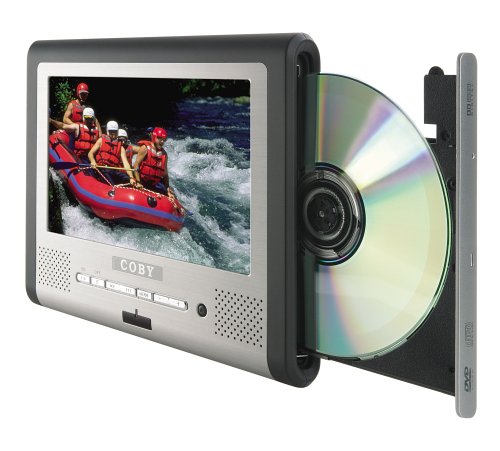
الشكل 1: Coby TFDVD-7700 Portable DVD Player and its remote control. The player features a 7-inch screen, control buttons below the screen, and a side-loading DVD slot. The remote control has numerous buttons for full functionality.
المميزات الرئيسية:
- 7-inch Widescreen TFT LCD Display
- Side-loading DVD Mechanism
- Multi-format Playback (DVD, MP3 CD, JPEG CD)
- مكبرات صوت ستيريو مدمجة
- Composite Video Output for external display connection
- جهاز تحكم عن بعد كامل الوظائف
- بطارية ليثيوم أيون قابلة لإعادة الشحن
- Picture Zoom and Parental Controls
يثبت
1. شحن البطارية
- Connect the 100-240V UL adapter to the DC IN port on the DVD player.
- قم بتوصيل المحول بمأخذ حائط قياسي.
- Allow the unit to charge fully before first use (approximately 3-4 hours). The charging indicator light will typically change color or turn off when charging is complete.
- For in-car use, connect the DC car charger to the DC IN port and plug it into your vehicle's cigarette lighter socket.
2. Inserting the Remote Control Battery
- افتح حجرة البطارية الموجودة في الجزء الخلفي من جهاز التحكم عن بعد.
- Insert the supplied battery, ensuring correct polarity (+/-).
- أغلق حجرة البطارية بشكل محكم.
3. الاتصال بشاشة خارجية (اختياري)
- Locate the composite video output port on the DVD player.
- Connect a composite video cable (not always included, may need to be purchased separately) from the player's video output to the video input of your TV or monitor.
- Ensure your TV/monitor is set to the correct input source.
تعليمات التشغيل
1. تشغيل / إيقاف التشغيل
- To power on, slide the POWER switch to the ON position or press the POWER button on the remote.
- To power off, slide the POWER switch to the OFF position or press the POWER button on the remote.
2. إدخال القرص
- With the unit powered on, gently insert a DVD, MP3 CD, or JPEG CD into the side-loading disc slot with the label side facing up.
- سيقوم المشغل تلقائيًا باكتشاف القرص وبدء التشغيل أو عرض قائمة القرص.
3. عناصر التحكم الأساسية في التشغيل
Use the buttons on the unit or the remote control:
- تشغيل/إيقاف مؤقت: اضغط لبدء التشغيل أو إيقافه مؤقتًا.
- قف: اضغط لإيقاف التشغيل.
- تخطي (<< / >>): اضغط للانتقال إلى الفصل/المسار السابق أو التالي.
- تقديم سريع / إعادة: اضغط مع الاستمرار للتقديم السريع أو الإرجاع.
- مستوى الصوت (+/-): ضبط مستوى الصوت.
4. استخدام سماعات الرأس
- Plug one or both sets of stereo headphones into the headphone jack(s).
- Use the headphone splitter to connect both sets of headphones to a single jack if needed.
- Adjust volume to a comfortable level to prevent hearing damage.
5. الميزات المتقدمة
- MENU: ادخل إلى القائمة الرئيسية للقرص.
- اقامة: Access the player's system settings (e.g., language, display settings, parental controls).
- تكبير: Enlarge a portion of the screen during video playback.
- زاوية: تغيير viewing angle on discs that support multiple angles.
- العنوان الفرعي: Select different subtitle tracks.
- SLOW/FAST MOTION: Control playback speed.
صيانة
1. تنظيف الوحدة
- امسح الجزء الخارجي من الوحدة بقطعة قماش ناعمة وجافة.
- بالنسبة للعلامات العنيدة، دampen the cloth slightly with water, then wipe dry immediately.
- لا تستخدم المنظفات الكاشطة أو الشمع أو المذيبات.
- To clean the screen, use a soft, lint-free cloth specifically designed for LCD screens.
2. العناية بالقرص
- قم بمعالجة الأقراص من حوافها لتجنب ترك بصمات الأصابع.
- Keep discs in their cases when not in use.
- قم بتنظيف الأقراص المتسخة باستخدام قطعة قماش ناعمة وخالية من الوبر، وامسحها من المركز إلى الخارج.
3. العناية بالبطارية
- Recharge the battery regularly, even if the unit is not used frequently, to maintain battery life.
- تجنب تفريغ البطارية بالكامل بشكل متكرر.
- قم بتخزين الجهاز في مكان بارد وجاف عند عدم استخدامه لفترات طويلة.
استكشاف الأخطاء وإصلاحها
If you encounter issues with your Coby TFDVD-7700, refer to the following common problems and solutions:
| مشكلة | السبب المحتمل | حل |
|---|---|---|
| الوحدة لا تعمل بالطاقة. | Battery is discharged; Power adapter not connected; Power switch is OFF. | Charge the battery; Connect the power adapter; Slide the POWER switch to ON. |
| لم يتم الكشف عن القرص / خطأ في القرص. | القرص متسخ أو به خدوش؛ تم إدخال القرص بشكل غير صحيح؛ تنسيق القرص غير مدعوم. | Clean the disc; Reinsert disc with label side up; Ensure disc is DVD, MP3 CD, or JPEG CD. |
| لا يوجد صوت. | Volume is too low; Headphones not connected properly; Mute function is active. | Increase volume; Reconnect headphones; Deactivate mute. |
| Picture is distorted or black. | External display connection issue; Disc problem. | Check composite video cable connection and TV input; Try a different disc. |
| جهاز التحكم عن بعد لا يعمل. | Battery is dead or inserted incorrectly; Obstruction between remote and player. | Replace or reinsert battery; Ensure clear line of sight to the player's IR sensor. |
تحديد
- نموذج: TFDVD-7700
- حجم الشاشة: 7 Inches (Widescreen TFT LCD)
- أنواع الوسائط المدعومة: DVD, CD-R, CD-RW, SVCD, MP3 CD, JPEG CD
- مخرج الصوت: Built-in Stereo Speakers, Headphone Jack
- إخراج الفيديو: فيديو مركب
- مصدر الطاقة: AC Adapter (100-240V), DC Car Charger, Rechargeable Lithium-ion Battery
- الشركة المصنعة: كوبي
معلومات الضمان
This product is covered by a limited warranty. Please refer to the warranty card included in your original packaging for specific terms and conditions, including coverage period and service procedures. Typically, Coby products come with a 90-day warranty on parts and labor from the date of purchase.
احتفظ بإيصال الشراء الخاص بك كدليل على الشراء في حالة مطالبات الضمان.
دعم العملاء
For technical assistance, troubleshooting beyond this manual, or warranty inquiries, please contact Coby customer support.
Please have your model number (TFDVD-7700) and proof of purchase ready when contacting support.
Contact information (phone number, website) would typically be provided on the manufacturer's official webالموقع أو في وثائق الضمان.