
1. المقدمة
This manual provides instructions for the setup, operation, and maintenance of your Bose MediaMate Computer Speakers. These speakers are designed to enhance the audio experience for your computer, whether for music, movies, or gaming. The compact design and upward-angled sound projection optimize audio delivery for desktop use, occupying minimal desk space.
2. معلومات السلامة
Please read and follow all safety instructions before using this product to prevent electric shock, fire, or injury. Keep this manual for future reference.
- لا تعرض مكبرات الصوت للماء أو الرطوبة.
- Do not place the speakers near heat sources such as radiators, heat registers, stoves, or other apparatus (including ampالمُضخِّمات) التي تنتج الحرارة.
- استخدم فقط المرفقات/الملحقات المحددة من قبل الشركة المصنعة.
- افصل هذا الجهاز أثناء العواصف الرعدية أو عند عدم استخدامه لفترات طويلة من الزمن.
- أحل جميع أعمال الصيانة إلى موظفي الصيانة المؤهلين. يلزم إجراء الصيانة عند تعرض الجهاز للتلف بأي شكل من الأشكال، مثل تلف سلك مصدر الطاقة أو القابس، أو انسكاب السوائل أو سقوط الأشياء داخل الجهاز، أو تعرض الجهاز للمطر أو الرطوبة، أو عدم تشغيله بشكل طبيعي، أو سقوطه.
3. محتويات العبوة
تأكد من وجود جميع العناصر في الحزمة الخاصة بك:
- Bose MediaMate Computer Speakers (2 units)
- محول الطاقة
- Audio Cable (3.5mm stereo jack)
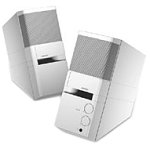
Image: The Bose MediaMate Computer Speakers in Gray. The image shows two compact speakers, one with visible volume and mix controls, and a headphone jack.
4. الإعداد
Follow these steps to set up your Bose MediaMate Computer Speakers:
- الموقع: Place the speakers on a flat, stable surface on either side of your computer monitor. Ensure they are angled slightly upward towards your listening position for optimal sound.
- توصيل كابل الصوت: Connect the 3.5mm audio cable from the back of the primary speaker (the one with controls) to the audio output jack on your computer.
- توصيل الطاقة: Plug the power adapter into the power input on the primary speaker, then plug the adapter into a wall outlet.
- تشغيل الطاقة: Turn on the speakers using the volume knob. The power indicator light should illuminate.
5. تعليمات التشغيل
Once set up, operating your MediaMate speakers is straightforward:
- التحكم في مستوى الصوت: Use the large knob labeled "VOLUME" on the front of the primary speaker to adjust the overall sound level.
- التحكم في المزج: The "MIX" knob allows you to blend audio from two different sources if you have a second device connected to the auxiliary input.
- مقبس سماعة الرأس: For private listening, plug your headphones into the headphone jack located on the front of the primary speaker. This will mute the speakers.
- المدخلات المزدوجة: The speakers feature dual inputs, allowing you to connect and mix two audio sources simultaneously. For example, you can connect your computer and a portable music player.
6. الصيانة
لضمان طول عمر مكبرات الصوت الخاصة بك وأدائها الأمثل:
- تنظيف: Use a soft, dry cloth to clean the exterior surfaces of the speakers. Do not use liquid cleaners or aerosols.
- تراب: قم بتنظيف شبكات مكبرات الصوت بانتظام لمنع تراكم الغبار الذي قد يؤثر على جودة الصوت.
- تخزين: في حال تخزين السماعات لفترة طويلة، افصلها عن مصدر الطاقة وخزنها في مكان بارد وجاف.
7. استكشاف الأخطاء وإصلاحها
If you encounter issues with your Bose MediaMate speakers, refer to the following common problems and solutions:
| مشكلة | السبب المحتمل | حل |
|---|---|---|
| لا يوجد صوت |
|
|
| صوت مشوه |
|
|
| مكبر صوت واحد فقط يعمل |
|
|
8. المواصفات
- ماركة: بوس
- نموذج: MediaMate
- الاتصال: 3.5mm Audio Input, AC Power
- مخرج الصوت: ستيريو
- نوع السماعة: الوسائط المتعددة
- مادة: معدن
- حجم السماعة: 6 Centimeters (Audio Driver)
- وزن السلعة: 3 رطل
- لون: رمادي
9. الضمان والدعم
Bose MediaMate Computer Speakers come with a limited warranty. For specific warranty details and duration, please refer to the warranty card included with your product or visit the official Bose webموقع.
For technical support, product registration, or service inquiries, please contact Bose customer service:
- هاتف: 800-444-2673
- Webموقع: www.bose.com
Please have your product model number (MediaMate) and purchase date available when contacting support.