
معلومات هامة حول السلامة
Please read all safety and operating instructions carefully before using this VCR. Retain this manual for future reference.
- مصدر الطاقة: Connect the VCR only to the power supply indicated on the label.
- تهوية: تأكد من التهوية الكافية. لا تسد فتحات التهوية.
- الماء والرطوبة: Do not expose the VCR to rain or moisture. Do not place objects filled with liquids on the VCR.
- تنظيف: Unplug the VCR from the wall outlet before cleaning. Use a dry cloth.
- الخدمة: لا تحاول خدمة هذا المنتج بنفسك. قم بإحالة جميع أعمال الصيانة إلى أفراد الخدمة المؤهلين.
المنتج انتهىview
The Sharp VC-A422 is a 4-head VCR designed for reliable playback and recording of VHS tapes. It features a user-friendly interface for easy operation.
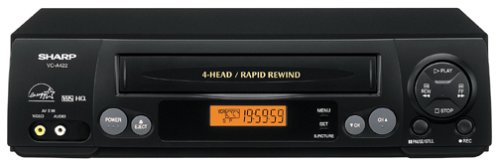
الصورة: الجبهة view of the Sharp VC-A422 4-Head VCR, showing the tape slot, display, and control buttons.
يثبت
1. فك التعبئة والتركيب
- قم بإخراج جهاز الفيديو من عبوته بعناية.
- Place the VCR on a stable, level surface. Ensure there is adequate space around the unit for ventilation.
- Avoid placing the VCR near heat sources, direct sunlight, or areas with high humidity.
2. الاتصال بالتلفزيون
To connect your VCR to a television, you will typically use RCA audio/video cables (red, white, yellow) or a coaxial cable.
- RCA Connection (Recommended for best quality):
- Connect the yellow video output jack on the VCR to the yellow video input jack on your TV.
- Connect the white audio output jack on the VCR to the white audio input jack on your TV.
- Connect the red audio output jack on the VCR to the red audio input jack on your TV.
- Select the corresponding AV input on your television (e.g., Video 1, AV1, Input 1).
- اتصال محوري:
- Connect a coaxial cable from the "RF Out" or "Antenna Out" jack on the VCR to the "Antenna In" or "RF In" jack on your TV.
- Connect your antenna or cable TV signal to the "RF In" or "Antenna In" jack on the VCR.
- Tune your television to channel 3 or 4 (depending on the VCR's output setting) to receive the VCR signal.
3. توصيل الطاقة
- Plug the VCR's power cord into a standard electrical outlet.
- The VCR should enter standby mode, indicated by a clock display or power light.
تعليمات التشغيل
1. التشغيل الأساسي
- Ensure the VCR is powered on and your TV is set to the correct input.
- أدخل شريط VHS في فتحة الشريط. سيقوم جهاز VCR بتحميل الشريط تلقائيًا.
- اضغط على يلعب الزر الموجود على جهاز VCR أو جهاز التحكم عن بعد.
- لإيقاف التشغيل ، اضغط على قف زر.
- لإيقاف التشغيل مؤقتًا، اضغط على يوقف اضغط مرة أخرى لاستئناف العملية.
- للتقديم السريع أو الإرجاع، اضغط على FF (تقديم سريع) أو ريو (Rewind) button. Press يلعب لاستئناف التشغيل العادي.
- لإخراج الشريط، اضغط على إخراج زر.
2. تسجيل البرامج
The Sharp VC-A422 allows for recording television programs. Ensure a blank or recordable VHS tape is inserted and its safety tab is intact.
- Tune the VCR to the desired channel using the VCR's tuner.
- اضغط على سِجِلّ button. The VCR will begin recording.
- لإيقاف التسجيل ، اضغط على قف زر.
- For timed recordings, refer to the VCR's on-screen programming guide (if available) or consult the full manual for detailed timer recording instructions.
صيانة
Proper maintenance ensures the longevity and optimal performance of your VCR.
- التنظيف الخارجي: Wipe the exterior of the VCR with a soft, dry cloth. Do not use liquid cleaners or abrasive materials.
- تنظيف الرأس: If picture quality degrades (e.g., snowy picture, lines), the video heads may be dirty. Use a dry-type VCR head cleaning cassette sparingly. Excessive use can wear down the heads.
- العناية بالشريط اللاصق: Store VHS tapes in their cases, away from dust, direct sunlight, and strong magnetic fields. Avoid exposing tapes to extreme temperatures.
- تهوية: Keep the VCR's ventilation slots clear of obstructions to prevent overheating.
استكشاف الأخطاء وإصلاحها
If you encounter issues with your Sharp VC-A422 VCR, refer to the following common problems and solutions:
| مشكلة | السبب المحتمل | حل |
|---|---|---|
| لا يوجد طاقة | سلك الطاقة غير موصول بالكهرباء؛ مأخذ الطاقة غير نشط. | تأكد من توصيل سلك الطاقة. اختبر المنفذ بجهاز آخر. |
| لا يوجد صورة أو صوت | Incorrect TV input selected; A/V cables loose or incorrectly connected. | Select correct TV input (e.g., AV1, Video 1). Ensure A/V cables are securely connected to matching color ports. |
| Snowy or distorted picture | Dirty video heads; poor tape quality; incorrect channel for coaxial connection. | Use a VCR head cleaning cassette. Try a different tape. If using coaxial, ensure TV is on channel 3 or 4. |
| Tape will not eject | Power failure; mechanical issue. | Ensure VCR is powered on. If problem persists, seek professional service. |
| لا يمكن التسجيل | Tape's safety tab removed; VCR not tuned to a channel. | Check if the safety tab on the VHS tape is intact (cover the notch with tape if removed). Ensure VCR tuner is set to the desired channel. |
تحديد
- ماركة: حاد
- نموذج: في سي-ايه422
- رؤساء: 4-Head (Video)
- وزن السلعة: 6 رطل
- أبعاد الحزمة: 15.55 × 11.02 × 5.24 بوصة
- ASIN: B00005LABU
- تاريخ التوفر الأول: 4 سبتمبر 1999
ملاحظة: المواصفات عرضة للتغيير دون إشعار.
معلومات الضمان
This Sharp product is covered by a limited warranty. For specific details regarding warranty coverage, duration, and terms, please refer to the warranty card included with your purchase or visit the official Sharp webالموقع. احتفظ بإثبات الشراء الخاص بك لتقديم مطالبات الضمان.
دعم العملاء
For further assistance, technical support, or service inquiries, please contact Sharp customer support. You can find contact information on the official Sharp webيمكنك الاطلاع على المعلومات المتوفرة في الموقع أو في الوثائق المرفقة مع منتجك.
Visit the official Sharp store for more information: متجر شارب الرسمي
إخلاء المسؤولية القانونية
تنبيه للمستهلك: This television receiver has only an analog broadcast tuner and will require a converter box after February 17, 2009 to receive over-the-air broadcasts with an antenna because of the U.S.'s transition to digital broadcasting. Analog-only TVs should continue to work as before with cable and satellite TV services, gaming consoles, VCRs, DVD players, and similar products. For more information, call the Federal Communications Commission at 1-888-225-5322 (TTY: 1-888-835-5322), or visit the commission s digital-television Web الموقع في: www.dtv.gov.