
مقدمة
The Vivitar 450PZ is a compact 35mm camera designed for ease of use, featuring fully automatic operation. This manual provides essential information for setting up, operating, maintaining, and troubleshooting your camera to ensure optimal performance.
The camera incorporates automatic focusing and exposure, a 38 to 70mm zoom lens, an automatic flash with red-eye reduction, and motorized film handling. An electronic self-timer is also included for convenience.
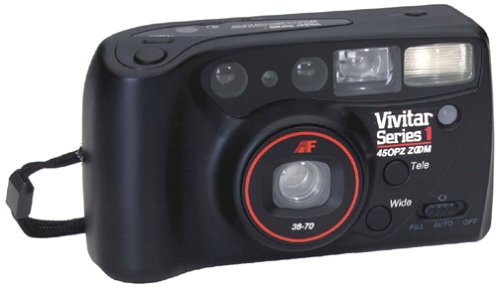
الصورة: الجبهة view of the Vivitar 450PZ 35mm Camera, showcasinبفضل تصميمها المدمج وعدساتها.
يثبت
1. تركيب البطارية
- حدد موقع غطاء حجرة البطارية على جسم الكاميرا.
- Open the cover by sliding or lifting it according to the indicator.
- Insert the required CR123A type batteries, ensuring correct polarity (+/-) as indicated inside the compartment.
- أغلق غطاء حجرة البطارية جيدًا.
2. تحميل الفيلم
- Open the camera back by sliding the latch.
- Place a 35mm film cartridge into the film chamber.
- Pull the film leader across to the film take-up spool, aligning it with the start mark.
- Close the camera back. The camera will automatically advance the film to the first frame.
3. Wrist Strap Attachment
Attach the provided wrist strap to the designated loop on the camera body. This helps prevent accidental drops and provides a secure grip during use.
تشغيل الكاميرا
1. تشغيل/إيقاف التشغيل
Locate the power button or switch, typically near the shutter button. Press or slide it to turn the camera on or off.
2. التقاط الصور
- انظر من خلال viewأداة للعثور على الصورة المناسبة لك.
- Press the shutter button halfway down to activate the autofocus and exposure systems. The camera will automatically set the focus and exposure.
- Press the shutter button fully down to take the picture. The film will automatically advance to the next frame.
3. وظيفة التكبير
Use the zoom control (usually a lever or buttons near the shutter) to adjust the focal length between 38mm (wide-angle) and 70mm (telephoto). This allows you to bring subjects closer or capture a wider scene.
4. Flash Operation
- فلاش تلقائي: The flash will automatically fire in dimly lit conditions to ensure proper exposure.
- تقليل العين الحمراء: When activated, the camera emits a series of pre-flashes before the main flash to reduce the red-eye effect in portraits.
- Flash Off Mode: For situations where flash is not desired (e.g., museums, theater), locate the flash mode button and select the 'flash off' setting.
5. الموقت الذاتي
To use the self-timer, press the self-timer button. A flashing LED indicator will typically signal the countdown. After a set delay (e.g., 10 seconds), the camera will automatically take the picture, allowing the photographer to be included in the shot.
6. Film Rewind
When the film roll is complete, the camera will automatically rewind the film back into the cartridge. A mid-roll rewind function may also be available, allowing you to rewind the film before the roll is finished by pressing a specific button (refer to camera markings if available).
صيانة
تنظيف الكاميرا
- استخدم قطعة قماش ناعمة وخالية من الوبر لمسح جسم الكاميرا برفق.
- For the lens, use a specialized lens cleaning cloth and lens cleaning solution. Avoid touching the lens surface with your fingers.
- Do not use abrasive cleaners or solvents, as these can damage the camera's finish and optical components.
تخزين
- عند عدم استخدام الكاميرا، قم بتخزينها في مكان بارد وجاف بعيدًا عن أشعة الشمس المباشرة ودرجات الحرارة القصوى.
- قم بإزالة البطاريات إذا لم يتم استخدام الكاميرا لفترة طويلة لمنع التسرب.
استكشاف الأخطاء وإصلاحها
الكاميرا لا تعمل
- تأكد من إدخال البطاريات بشكل صحيح مع مراعاة القطبية المناسبة.
- استبدل البطاريات القديمة أو المستنفدة بأخرى جديدة.
- تأكد من أن مفتاح الطاقة في وضع "التشغيل".
Film Not Advancing
- Verify that the film is correctly loaded and the leader is engaged with the take-up spool.
- Check if the film door is securely closed.
- Ensure there is enough power from the batteries for the motor to operate.
Flash Not Firing
- Confirm that the flash is not set to 'Flash Off' mode.
- Allow sufficient time for the flash to charge (indicated by a flash ready lamp).
- Ensure ambient light conditions are dark enough for the automatic flash to activate.
تحديد
| ميزة | التفاصيل |
|---|---|
| ماركة | VIVITAR |
| اسم الموديل | 450 قطعة |
| نوع تنسيق الفيلم | 35 ملم |
| عدسة | 38-70mm Zoom |
| التحكم في التعرض | اوتوماتيكي |
| نظام التركيز | 14-zone Autofocus |
| فلاش | Automatic with Red-Eye Reduction |
| التعامل مع الأفلام | Motorized Loading, Advance, and Rewind |
| المميزات الخاصة | Built-In Flash, Compact Design, Electronic Self-Timer |
| وزن العنصر | 15.2 أونصات |
| المكونات المضمنة | هيكل الكاميرا والعدسة |
الضمان والدعم
معلومات الضمان
The Vivitar 450PZ camera comes with a warranty covering one year on parts and 90 days on labor from the date of purchase. Please retain your proof of purchase for warranty claims.
دعم العملاء
For technical assistance, service, or further inquiries regarding your Vivitar 450PZ camera, please refer to the contact information provided with your product packaging or visit the official Vivitar webموقع لموارد الدعم.